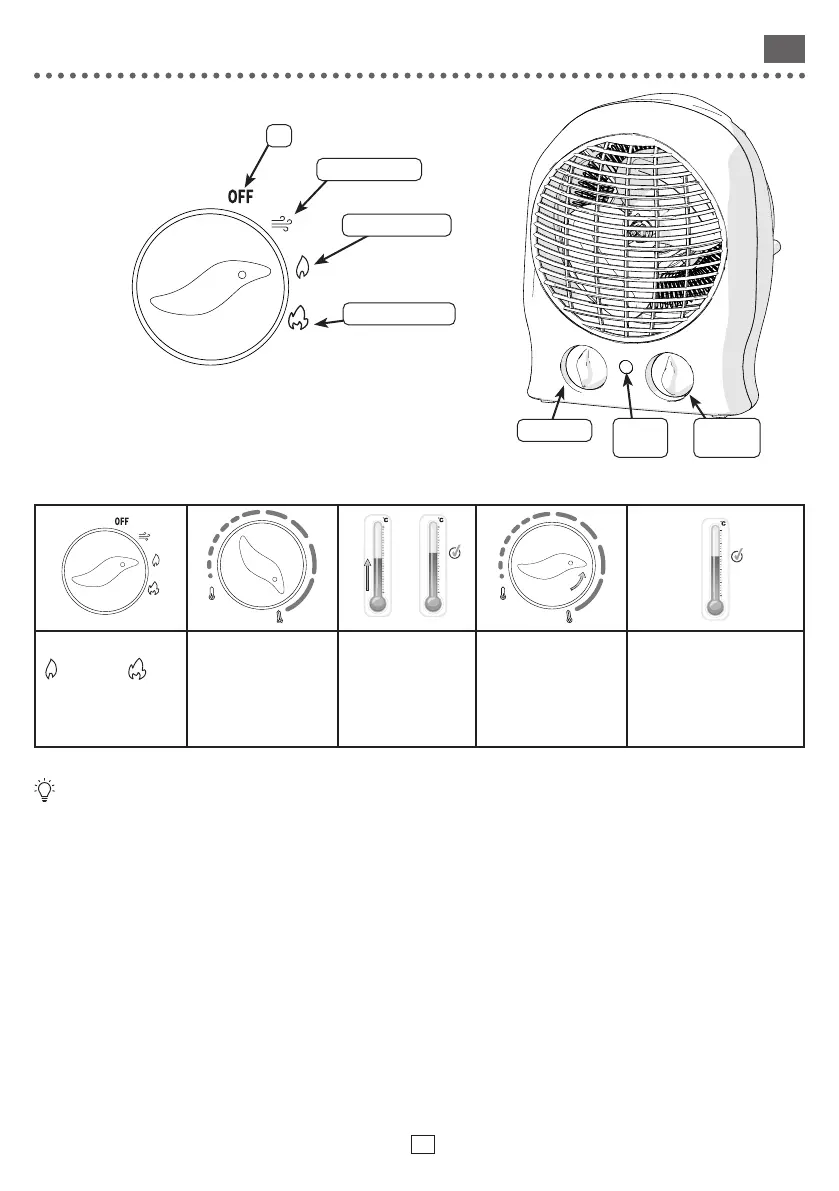
USE
• Place the button on desired position to start the heater.
• Place the button to OFF position to turn o the heater.
Adjust the thermostat :
40
30
20
10
0
-10
40
30
20
10
0
-10
40
30
20
10
0
-10
Choose Heating Power
(1000W) or
(2000W).
Place button on max
temperature.
Wait until the
desired room
temperature is
reached.
Turn slowly the button
until the appliance
switches o (the
heating indicator goes
out)
The appliance will heat
as soon as the room
temperature drops
to maintain this set
temperature.
A thermal safety device automatically cuts the heating element in the event of overheating. In this
case, the fan continues to run to cool the device, and the appliance can re-start as soon as the normal
conditions and temperature needed for it to function are re-established.
CARE
• Use a soft, dry cloth.
• For persistent stains, use a cloth dampened with soapy water and wipe immediately with a dry cloth.
TROUBLESHOOTING
Malfunctions are often due to minor causes; please read the table below before contacting the after-sales service.
This can save you time and avoid unnecessary expenses.
O
Fan without Heater
Fan with low Heater
Fan with high Heater
Adjust the
thermostat
Adjust Power
Heating
indicator
53
EN






 To Next Page