P
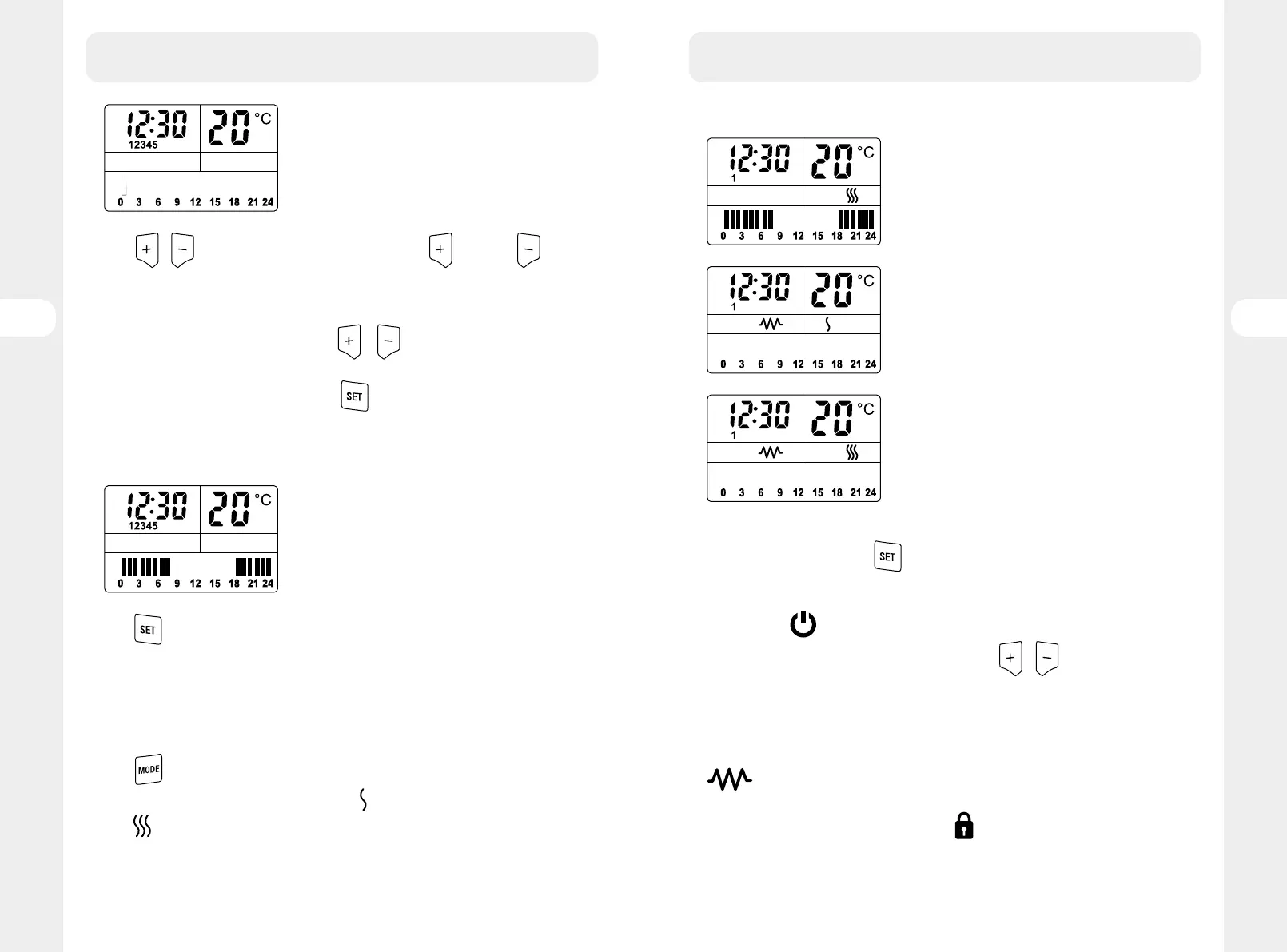
Press / to set on/off heating status in this hours, means on, means
off , one block means one hour, when with block, the heater will work in this hour, if
without, the heater won’t work in this hour. When one block get set, it will go to next
block automatically and wait for setting. After setting block 24h, if user want to modify
the previous set program, keep pressing on
or , it will go to first block to modify
the previous setting.
When the user confirm the setting, press on
to go to the next step.
If there is no pressing on any button, the twinkle would stop after 10 seconds.
Note: the first block means the hour from 0 o’clock to 1 o’clock
If we set the heater working from 18:00 ~ 8:00 in workday, the picture is as following:
P
Press again, 67 appears on the screen, set the heating status in the same way.
If there is no pressing, the twinkle would stop after 10 seconds and setting will be
finished automatically.
The heater will work according to the heating status when setting the working time in
workday and weekend.
Mode setting & Power setting
Press
to select the working mode, it will get change like following: Program mode
(P), Manual setting for low power 1200W (M+
), Manual setting for full power 2000W
(M+
), keep pressing, it will go back to Program mode. Select the desired mode by
keep pressing.
3. HOW TO USE
The Screen will display like following picture for different mode:
P
Program Mode
M
Manual mode with low power setting
M
Manual mode with full power setting
Continuous mode:
When in manual mode, press
, the temperature will display “HI”, the heater will
keep working in continuous mode.
If user didn’t change any setting, after 12 hours, the heater will stop and get into stand-
by mode, press
to restart the equipment, the heater will work in previous setting.
If user wants to set the target temperature, press
/ directly to select the
temperature from 5-35ºC, when the target temperature is set, the continuous heating
mode will be automatically stopped and changed into normal heating ways. If user
wants to restart the continuous heating mode, press SET to repeat the same process.
Other note:
will be showed only the unit is heating.
Unit is with button lock function to avoid wrong pressing when the heating is under
normal working. The buttons will be locked (
) after 1 minute if you don’t press any
button.
3. HOW TO USE
8584
FR
ES
PT
FR
ES
PT
EL
PL
RO
EL
PL
RO
EN
EN





 To Next Page