Need help?
Do you have a question about the Equity 73002 and is the answer not in the manual?
Instructions for powering the clock using batteries and initial setup.
Guide to setting the clock's hour and minute.
Instructions for setting the year, month, and date.
How to switch between 12-hour and 24-hour time display formats.
Procedure for setting the desired alarm time.
How to turn the alarm function on or off.
Using the snooze feature to temporarily silence the alarm.
Information on activating the backlight and the automatic smart light feature.
Instructions for battery replacement and general care.
Details on power source and physical size of the clock.
Information on the product's warranty and how to get support.
Compliance information regarding FCC rules for digital devices.
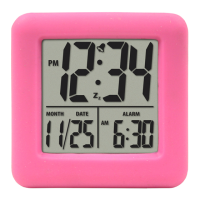
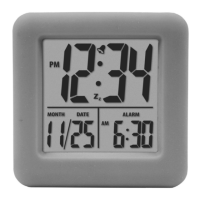
The Equity Color Cube Alarm Clock is a compact and versatile timekeeping device designed for ease of use and readability. Its primary function is to display time and date, provide an alarm, and offer backlight features for visibility in various lighting conditions.
The clock operates on two "AA" batteries (not included) and is designed for an extended battery life of over 12 months. It features a clear digital display that shows the time (in 12-hour or 24-hour format), month, and date. The device includes a "LOCK" switch with three positions: Time, Calendar, and Alarm, which simplifies the setup process for each function.
Time Setting: To set the time, the user slides the LOCK switch to the "Time" position. The hour and minute digits will flash, allowing adjustment using the "HOUR" and "MINUTE" buttons. Once set, the LOCK switch is returned to the "Lock" position for normal operation. Calendar Setting: Similarly, for calendar settings, the LOCK switch is moved to the "Calendar" position. The year, month, and date will flash, and can be adjusted using the "YEAR," "MONTH," and "DATE" buttons respectively. After setting, the switch is returned to "Lock." 12-Hour or 24-Hour Display: The clock offers flexibility in time display. Users can press the "12/24" button to switch between a 12-hour and a 24-hour format. When using the 24-hour clock, the AM and PM indicators will not be displayed. Alarm Setting: The alarm function is set by sliding the LOCK switch to the "Alarm" position. The hour and minute digits will flash, allowing adjustment with the "HOUR" and "MINUTE" buttons. After setting, the switch is returned to "Lock." Alarm Activation/Deactivation: An "ALARM ON/OFF" switch controls the alarm's active state. Sliding it to "ON" activates the alarm, indicated by an Alarm Icon on the display. Sliding it to "OFF" deactivates it. When the alarm sounds, pressing any button (except SNOOZE/LIGHT) will stop it for 24 hours. If no button is pressed, the alarm will sound for 60 seconds before automatically shutting off for 24 hours. Snooze Function: The clock includes a snooze feature. When the alarm sounds, pressing the "SNOOZE/LIGHT" button silences the alarm for 5 minutes. During snooze, both the Alarm and Snooze Zz Icons will be displayed, with the snooze icon flashing. The snooze duration can be repeated. After the snooze period, the alarm will sound again for 60 seconds unless the ALARM ON/OFF switch is moved to "OFF."
Backlight: A bright backlight can be activated for 5 seconds by pressing the "SNOOZE/LIGHT" button, enhancing visibility in low-light conditions. Smart Light: The clock incorporates a "Smart Light" sensor within the "SNOOZE/LIGHT" button. In a dark room, this sensor automatically provides a dim backlight, allowing the time to be read easily without disturbing sleep. This dim backlight resumes after the bright backlight (activated by pressing the button) times out, as long as the room remains dark.
Battery Replacement: Proper battery maintenance is crucial for the clock's longevity and performance. Users are advised to:
Warranty and Support: Equity provides a 2-year limited warranty covering material and workmanship defects from the date of purchase. This warranty does not cover damage from misuse or negligence. All implied warranties are limited to this two-year period. For warranty service, customers should send the product, a letter explaining the problem, and $5.00 for postage and handling to the Equity by La Crosse Warranty Department at 2830 26th St S., La Crosse, WI 54601.
FCC Compliance: The device complies with Part 15 of the FCC Rules, ensuring it does not cause harmful interference and accepts any interference received. Users are cautioned that any unauthorized changes or modifications to the unit could void their authority to operate the equipment.
California Proposition 65 Warning: The product may expose users to chemicals, including styrene, known to the State of California to cause cancer. Further information is available at www.P65Warnings.ca.gov.
 General
| Brand | Equity |
|---|---|
| Model | 73002 |
| Category | Alarm Clock |
| Language | English |

 To Next Page