Shen Zhen Shi Chuang Cheng Da Technology Co., Ltd
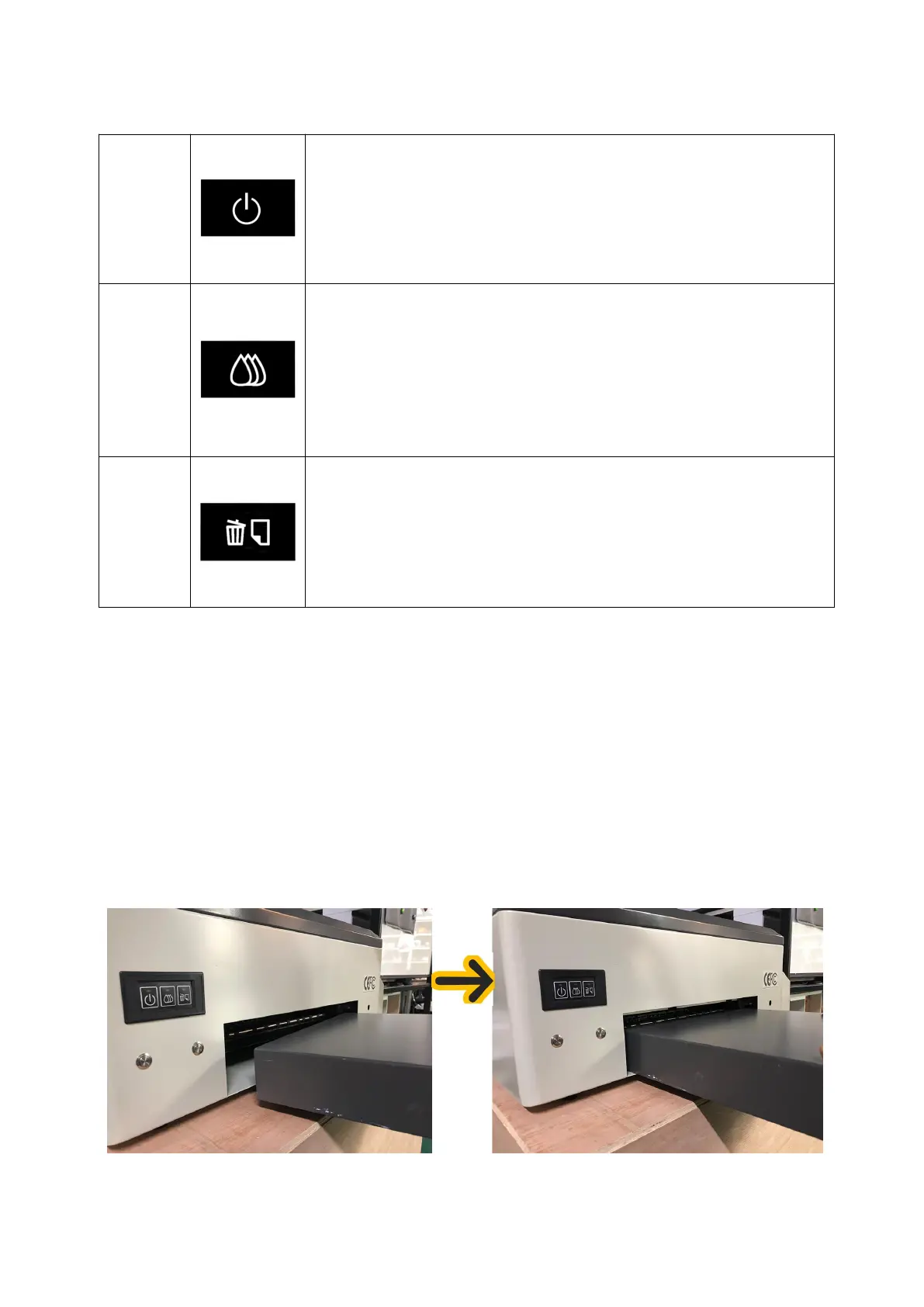
(3) Button Illustration
Press this button to open and close the printer power
Press this button to move the print head to the cartridge change location.
When detecting the service life of the cartridge market, press this button to
print the head to the ink check position.
After changing the cartridge, press this button to return the print head to the
initial position.
When the ink indicator lights go out, press the button for 3 seconds to clean
the print head.
Press this button to load or pop out the print paper.
You can resume printing if you press this button when there is a lack of paper
error or multiple page feed errors.
Press this button when printing jobs to cancel the print.
2. Unpacking and Inspection
(1)steps:
①Prepare a screwdriver and open the button of the wooden box.
②Insert the power cord, turn on the "main power switch" and the "power switch in the printer control panel",
and wait for the printer to finish self-inspection.
③Place the platform in a fixed position and ensure that the connection between the platform and the printer is
aligned.
(2)Notes:
①Only one power-on inspection to be carried out;
②After ensuring that the printer's appearance and self-inspection status are normal, then fill the
ink.
3. Print Drive Installation
(1) steps:


 To Next Page
 Loading...