IMPORTANT SAFETY INSTRUCTIONS
• Please carefully read all instructions before attempting installation. If you do
not understand the instructions or have any concerns or questions, please
contact our Technical Support line at 1-800-651-9525 or customer service at
support@ergear.com.
CAUTION: Avoid potential personal injuries and property damage!
• Do not use this product for any purpose that is not explicitly specified in this
manual. Do not exceed weight capacity. We are not liable for damage or injury
caused by improper mounting, incorrect assembly or inappropriate use.
• The desk must be capable of supporting five times the weight of the monitor
and mount combined.
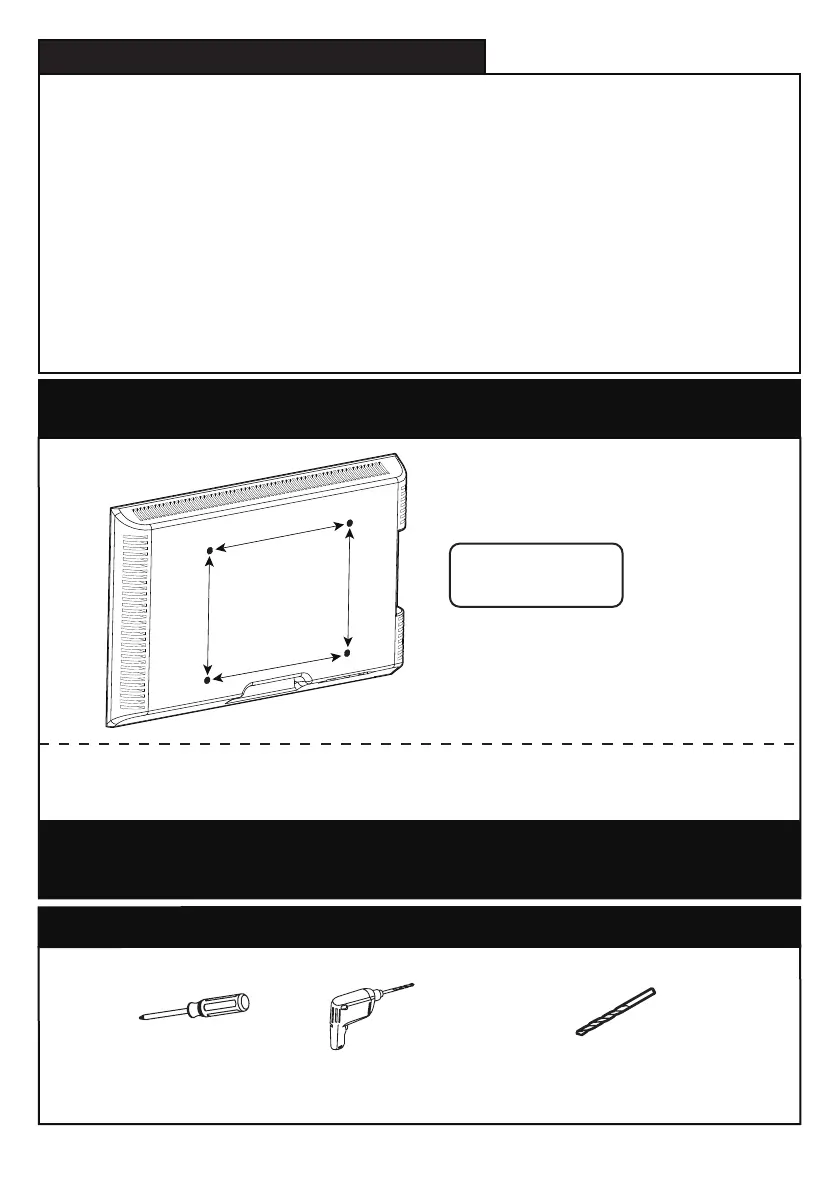
Check the VESA Pattern of Your Monitor before You Begin the
Installation
If this desk mount is NOT compatible, please contact customer service
at support@ergear.com to find a compatible product.
If your monitor VESA is greater than 100x100 mm/4x4 in. or less than
VESA 75x75mm/3x3in., this mount is NOT compatible.
75 mm ≈ 3 in.
100 mm ≈ 4 in.
Minimum VESA pattern:
75mm/3 in.(W)x75mm/3 in.(H)
MAX:100
mm/4 in.
MAX:100
mm/4 in.
MAX:100
mm/4 in.
Tool Need(Not Included)
Phillips
Screwdriver
Drill(Optional)
1/2 in.(13mm) - 1 in.(25mm)
Drill Bit (Optional)
01 02 03 04 05 06 07


 To Next Page