The upCentric® UP-2LV is an electric height-adjustable table designed to allow users to easily adjust their work surface to an optimal working height and to alternate between seated and standing positions throughout the workday. This functionality aims to reduce backaches, pains, stress, and tension, and improve circulation. The table's movement is intuitive, controlled by an easy-to-use up/down control, and quiet motors in each leg ensure a quick, smooth transition. The upCentric 2LV frame is versatile, accommodating various work surface sizes and shapes, making it suitable for retrofitting existing surfaces. Its durable open frame design provides optimal knee clearance and space for storage.
Important Technical Specifications:
The UP-2LV series includes two models: UP-2LV-22 (22") and UP-2LV-29 (29").
Both models share the following specifications:
- Height range (Frame only, does not include tabletop): 21.6"-47.9"
- Depth of bracket: 19.7"
- Travel speed: 1.6" per second
- Volume: 39 Db
- Weight capacity: 220 lbs
- Motors: 2 (1 per leg)
- Max. operational power draw: 180 W
- Stand-by power draw: <0.1 W
- Power cord length: 1.8 m (70.85")
- Certifications: BIFMA X5.5 | CSA | GREENGUARD Gold | UL
Model-specific specifications:
- UP-2LV-22 (22"):
- Depth of foot: 21.65"
- Tabletop size range: 22"x44"-28"x84"
- UP-2LV-29 (29"):
- Depth of foot: 29.5"
- Tabletop size range: 29"x44"-36"x84"
Usage Features:
- Presettable Memory Positions: The table comes standard with 4 presettable memory positions, allowing users to set customized seated and standing table heights for quick adjustment.
- One-Touch Adjustment: Once a memory position is set, a single press of the corresponding button (1, 2, 3, or 4) will automatically adjust the table to the preset height, eliminating the need to hold the up or down button.
- Minimum/Maximum Heights: Users can set a minimum or maximum allowable adjustment height within the table's range. This feature helps prevent accidental contact with objects above or below the work surface (e.g., storage pedestals, shelves), reducing potential damage or injury. These limits can be cleared and reset at any time.
- Customizable Digital Display Settings:
- Changing Desk Starting Height: The default starting height on the digital display is 22.9". If casters are added or the tabletop thickness differs from 1", the starting height can be adjusted to accurately reflect the actual lowest height of the work surface.
- Converting Between Metric and Imperial Measurements: The default unit of measure (UOM) is inches, but users can switch to centimeters.
- Gyro-Sensor Anti-Collision System: A built-in, patented gyro-sensor system uses precision gyroscope technology for three-axis collision detection. This enhances safety by preventing user injury and equipment damage. If the table encounters external resistance or unbalance during motion, the sensor immediately detects the disturbance, stops movement, and reverses adjustment by 1" to move away from the obstruction.
- Power-Saving and Quick Start Wake-Up: The table has a low power draw. After 30 seconds of inactivity, the control box enters stand-by mode, consuming less than 0.1 W of electricity. Pressing any button wakes the system up immediately, with no wake-up delay, allowing the table to start moving instantly.
- All screws must be tightened before use and after moving or transporting the table.
- Duty Cycle: The frame has a duty cycle of 10%, meaning a maximum of 2 minutes of operation followed by 18 minutes of rest.
- Load Capacity: The table's maximum load capacity is 220 lbs (99.8 kg), with each leg supporting a maximum of 140 lbs (63.5 kg). Exceeding these limits can cause permanent damage.
- Motor Cable Connection: When the motor cable is connected to the control box, legs maintain adequate locking force. If the cable is damaged or disconnected, the desk may sink if the load on either leg exceeds maximum capacity.
- Collision Prevention: Ensure no persons or items collide with the table during upward or downward adjustments.
- Cord Maintenance: Damaged cords must be replaced before connecting the main power cable. Keep cords away from heated surfaces.
- Clearance: Maintain at least 3/4" of free space around the entire frame/tabletop.
- Intended Use: The upCentric® is not intended to be used as a person lift.
- Movement: Do not pull or push the table while it is adjusting. Do not lift the frame or table off the ground during adjustment.
- Installation/Re-installation:
- Replace damaged power cords.
- Do not open electrical components (control box, motor housing, handset).
- Never drop or insert objects into openings.
- Use correct tools and assembly parts.
- Remove the power cord from the main supply before transporting the table.
- Operation:
- Not for use by children.
- For indoor use only.
- Unplug the table from the electrical outlet before cleaning, installing, or removing parts.
- Do not operate where aerosol products are used or oxygen is administered.
- To disconnect, lower the table to minimum height, then remove the plug.
- If heavily loaded, keep the load away from edges to prevent tipping.
- Any servicing must be performed by an authorized service representative.
- If the control box or legs make unusual noises or smells, immediately unplug the table.
Maintenance Features (Troubleshooting):
The manual provides a troubleshooting guide for common issues, emphasizing re-synchronization as a primary step.
- Synchronize Table Legs: Before troubleshooting, perform a re-synchronization by holding the up/down buttons simultaneously for 3-5 seconds until both legs reach the lowest position and the handset beeps. This may need to be repeated if the desk does not beep or is not level.
- Error Codes: The display shows specific error codes (E00-E33) indicating issues like synchronization in progress, overuse protection, unbalance protection, anti-collision, T-touch protection, motor over-current protection, and Hall sensor or current issues from motors.
- No Movement at All: Check for power (green light on control box), handset display, secure connections, and perform a re-sync. If issues persist, a service technician is needed.
- Only One Leg Moves: Perform re-sync repeatedly until both legs reach the lowest position. If unsuccessful, contact a service technician.
- Received Frame Without a Control Box: This indicates an incorrect frame was sent (e.g., 3-Leg instead of 2-Leg). Contact ergoCentric for the correct part.
- Cords to Handset Are Too Short: Request extension cords from ergoCentric.
- Motor Housing (where leg meets frame) Is Open: Inspect for internal damage. If none, clip the plastic cover down. If damaged, the leg needs replacement. Warranty is not voided if the motor housing was opened for inspection.
- Control Box Is Cracked/Damaged: Document damage and request a new control box.
- Wires Are Damaged: Document damage and request new AC cable, handset, or leg.
- Handset and Control Box Are Not Working: Unplug and replug all connections, perform re-sync, check for green light on control box, and handset display. Request new parts or technician if needed.
- Legs Are Not Moving Together: Test with a new control box. If the problem persists, spare legs may be needed for testing and replacement.
- Frame Is Leaking Lubricant from the Bottom of a Leg: This indicates over-lubrication and does not affect mechanical function. Wipe off excess lubricant.
- Mid-Section of Leg Does Not Adjust with Whole Leg: The leg will still function but may make noise. If persistent, a service technician can replace the leg.
Disposal Guidance:
upCentric® height-adjustable tables can be divided into different waste groups for recycling or combustion. It is recommended to disassemble the table as much as possible before disposal. Main materials for waste sorting include metal, plastic, cable debris, and combustible materials. Electrical appliances should not be disposed of as unsorted municipal waste but according to municipal collection facilities to prevent hazardous substances from contaminating groundwater and the food chain.
Warranty:
- 12-year warranty: Covers frame structure and steel parts.
- 12-year warranty: Covers high-pressure laminate tabletops.
- 7-year warranty: Covers motors, wires, and all electronic components.
ergoCentric Seating Systems warrants its tables and accessories against defects and functional failures of materials. Warranties do not cover normal wear, negligence, abuse, accident, shipping damage, or use not in accordance with instructions. ergoCentric is not liable for indirect, special, incidental, consequential, or exemplary damages. The warranty is based on eight hours of work per day. Warranty claims involve repair or replacement of defective products, including labor and shipping costs. Claims should be directed to ergoCentric or an authorized representative. Warranties are valid for their stated duration and only for products owned by the original purchaser.
Assistance:
For assistance, contact ergoCentric:
- Phone: 1 866 GET ERGO (438-3746)
- Email: service@ergocentric.com

 Need help?
 General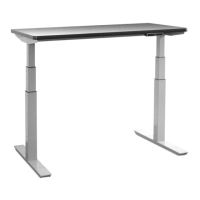

 To Next Page