16
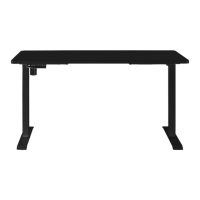
Ensure the desk has been assembled correctly before use.
Powering
Connect the power cable to a power outlet and turn the desk on.
Turn the outlet off to turn off the desk.
Adjusting desk height
Press the up or down buttons (▲, ▼) to adjust the height of the desk. The LED display will
show the currently set height.
Height memory function
This desk can save up to three heights, allowing ease of use when adjusting to commonly
used desk heights. To s a v e a height:
1. Press the up or down buttons (▲, ▼) to adjust the desk to the desired height.
2. Press the height memory button (M) to save the height. The LED display will show
‘ ’.
3. Press any of the position buttons (1, 2, or 3) to map the height to the selected button.
In future use, users only need to press the relevant position button to adjust to the
saved height.
Posture timer button
Sitting at a desk for continuous periods may lead to a slouched posture. This desk features
an alarm that can be set to ring after a specified period to remind users to correct their
posture. To set the timer:
1. Press the posture timer button (A) and the LED display will show ‘ ’.
2. Wait for two seconds, then press the up or down buttons (▲, ▼) to adjust the time set
on the timer. The default time is 45 minutes, and this will be shown on the LED
display as ‘45’. Any adjustments made to the time set will be reflected on the LED
display.
3. Once the desired time is selected, either press any button on the control box or wait
for five seconds to save the set time.
• When the timer elapses, the LED display will show ‘00’ and the desk will emit a
beeping tone for ten seconds. Within those ten seconds, press any button on the
control box to reset the timer. Alternatively, press and hold the posture timer button
(A) for three seconds to turn off the timer. The LED display will show ‘ ’.
• If no button is pressed within the ten-second period, the timer will emit another beep
after another five minutes. If no button is pressed when beeping, the timer will turn
off.
OPERATION


 To Next Page
 Loading...