of
GrevH•/
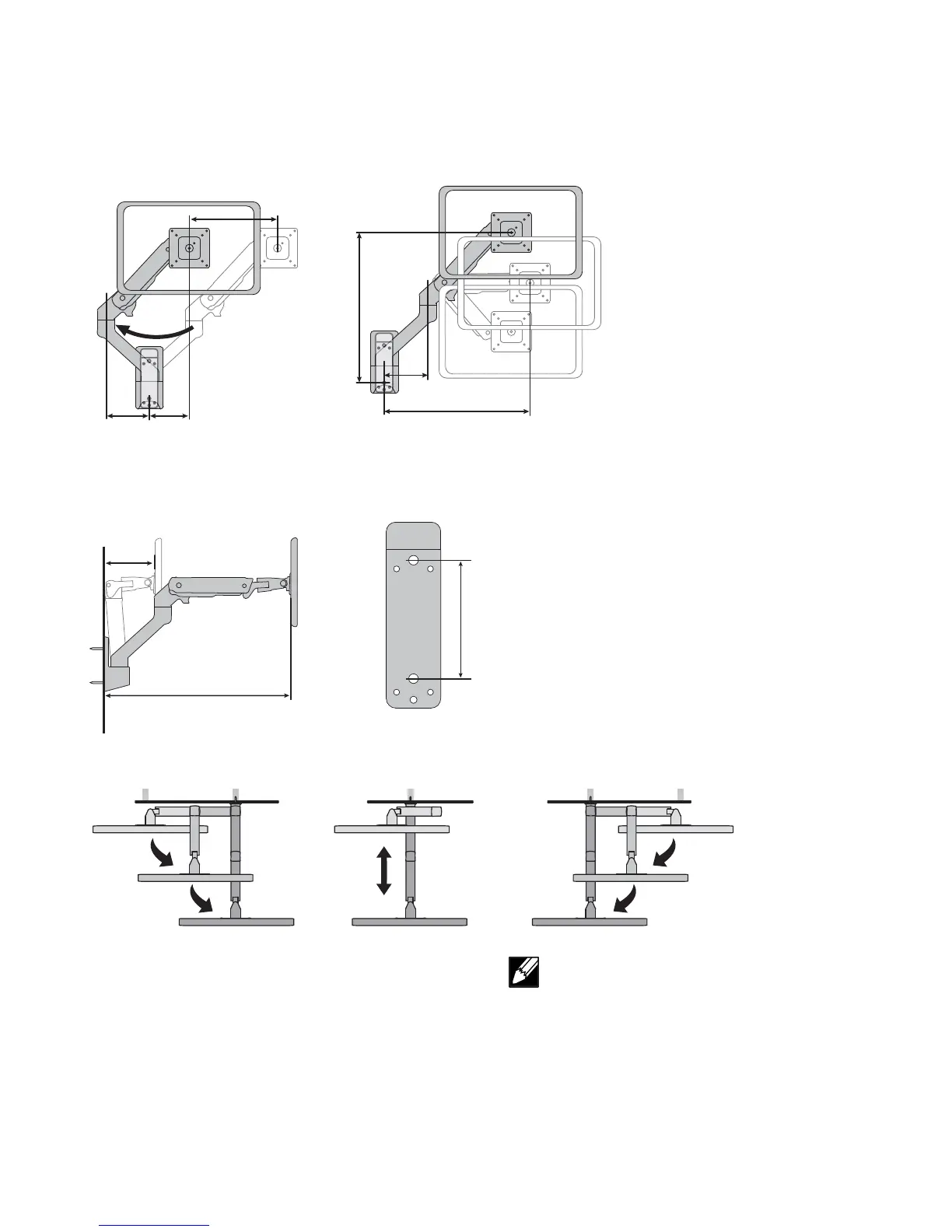
19.25"
(488 mm)
5.5"
(138 mm)
18.1"
(460 mm)
5.7"
(145 mm)
24.8
(630 mm)
3.9”
(100mm)
11"
(278mm)
5.5"
(138 mm)
4.75"
(121 mm)
モニターを壁から離した状態での動作範囲を示す上面図。
取り付け位置の決定:
アームを壁側に引いた状態の正面図。
注意:インストール前に、アームが通常、左か右に
傾くかどうかを確認します。
BlickvonobenzeigtBewegungsbereichnachHerausziehenausderWand
Montageposition bestimmen:
BlickvonvornemitgegendieWandgedrücktemArm
HINWEIS: Vor der Installation prüfen, ob der Arm nor-
malerweise nach links oder rechts eingeklappt wird.
Vuededessusmontrantl’amplitudedesmouvementslorsqu’ilestdégagédumur
Déterminez l’emplacement de pose:
Vuedefaceavecbraspoussécontrelemur
REMARQUE: Déterminez si le bras aura tendance
à tomber vers la gauche ou vers la droite avant
l'installation.
Vistasuperiorquemuestraelrangodemovimientocuandosealejadelapared
Determine el lugar de instalación:
Vistafrontalconelbrazoretraídocontralapared
NOTA: Determine si el brazo caerá normalmente
hacia la izquierda o hacia la derecha antes de la
instalación.
Determine mounting location:
Topviewshowingrangeofmotionwhenpulledoutfromthewall
Frontviewwitharmpushedbackagainstthewall
NOTE: Determine if arm will typically collapse to the
le or right before installation.






 To Next Page