1
1
2
3
1
2
1
2
1
2
www.ergotron.com
USA: 1-800-888-8458
Europe: +31 (0)33-45 45 600
China: 400-120-3051
Japan: japansupport@ergotron.com
777-24-046-G-01 rev. D • 03/19
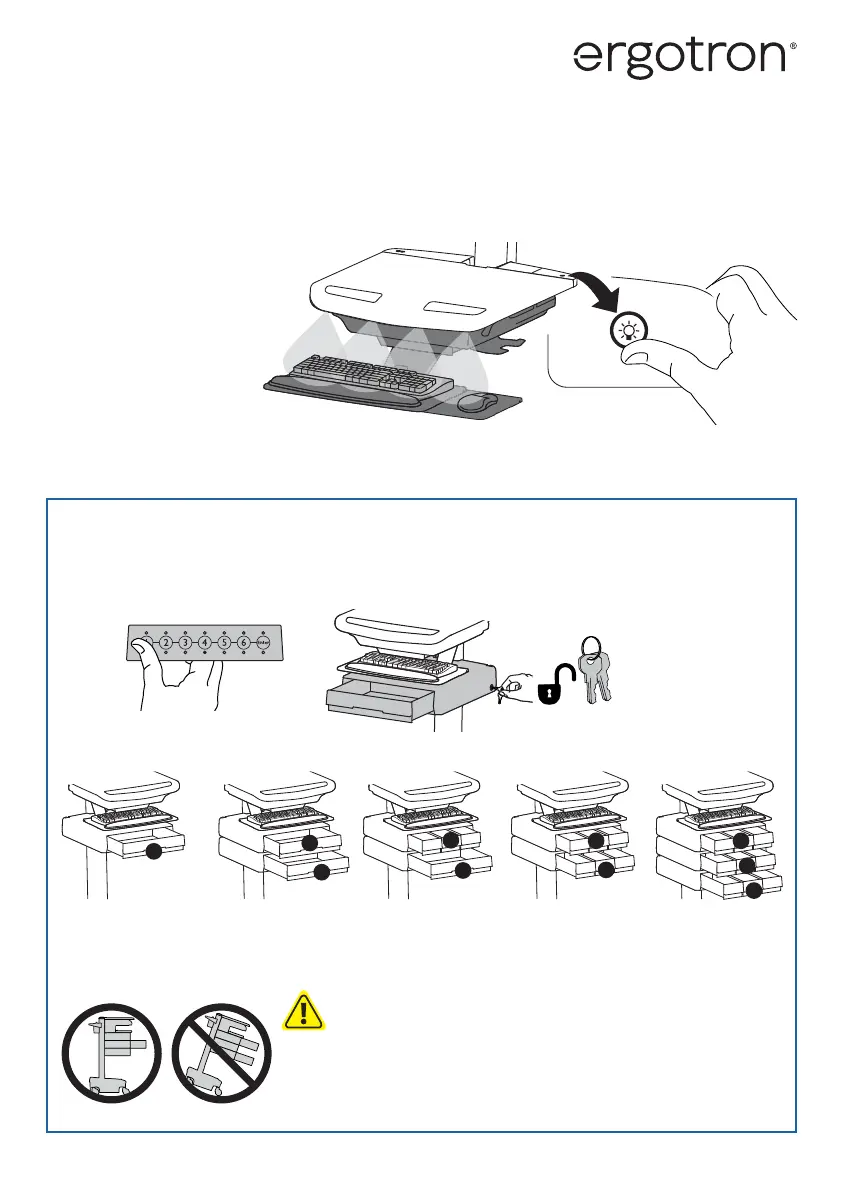
STYLEVIEW®
QUICK REFERENCE
KEYBOARD LIGHT
Your computer must be on for this light to function.
Keyboard Light will automatically turn o after 15 minutes if not manually turned o .
CAUTION: Close worksurface before opening drawers. Open only one drawer at a time. Do
Not push cart when drawers or worksurface are open. Failure to follow these instructions
may cause the cart to be unstable.
*Drawer Row Numbers:
Lock Drawer:
• Wait 4 seconds for lock to engage automatically.
NOTE: Always ensure drawer is pushed in all the way and engaged with lock.
Unlock Drawer (2 methods):
NOTE: All Drawers in row must be closed before a new row can be unlocked.
• Enter User PIN and press ENTER (only numbers for available drawer rows ash green), then press desired drawer row number*.
• Key






 To Previous Page