2 of 23
888-45-208-W-02 rev. N • 10/19
10mm
11 mm
13 mm
17mm
7/16"
11mm
1/4"
> 3"
Ø 3/8" (10 mm)
Ø 1/2" (12.8 mm)
Ø 7/32" (5.6 mm)
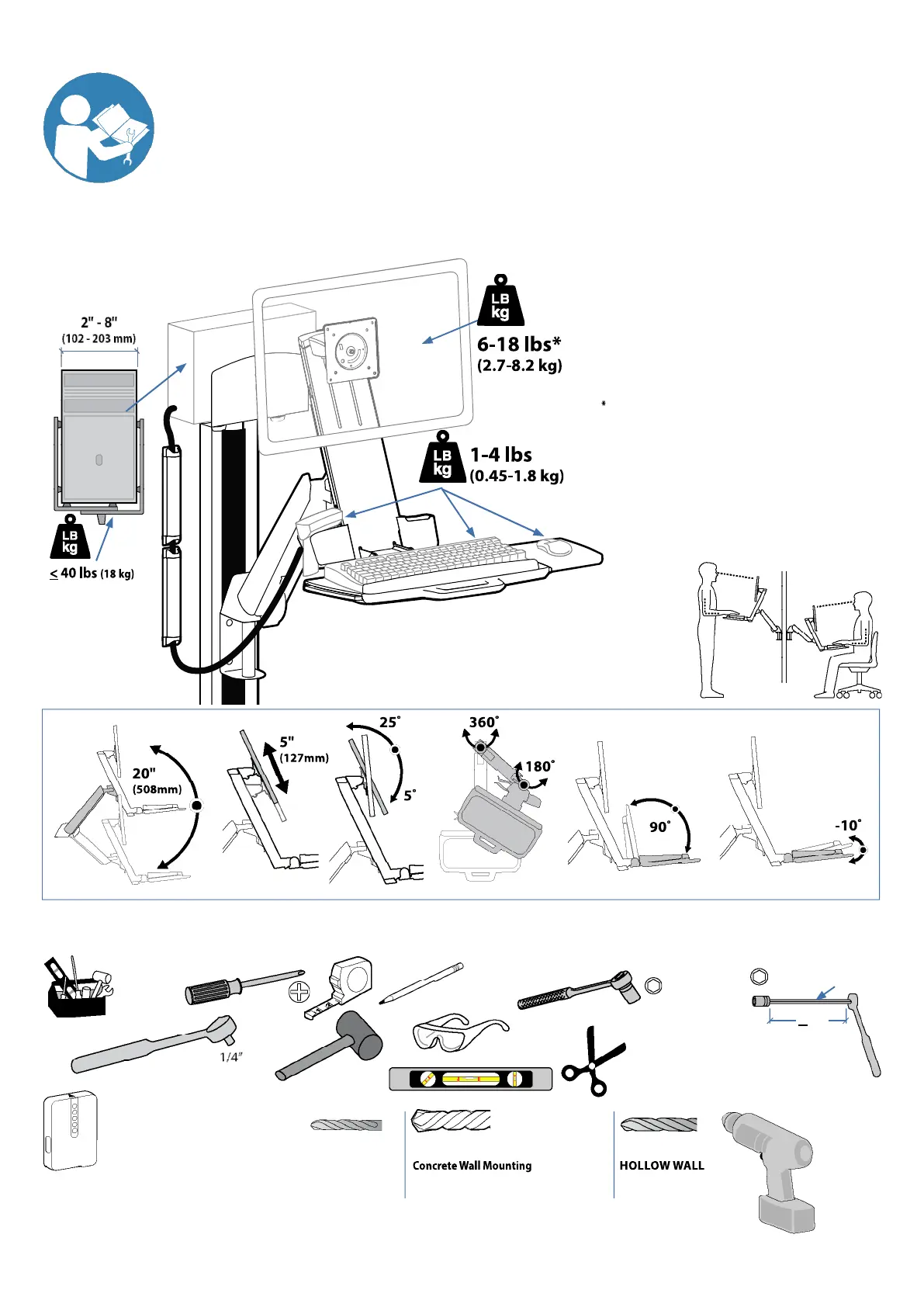
The Combo Arm can be modifi ed to mount displays up to 25 lbs
(11.3 kg), however display lift and tilt motion will not be possible if
this option is chosen. Refer to special instructions on page 14.
Important! You will need to adjust this product after installation is complete. Make sure all your equipment is properly
installed on the product before attempting adjustments. This product should move smoothly and easily through the
full range of motion and stay where you set it. If movements are too easy or diffi cult or if product does not stay in
desired positions, follow the adjustment instructions to create smooth and easy movements. Depending on your
product and the adjustment, it may take many turns to notice a diff erence. Any time equipment is added or removed
from this product, resulting in a change in the weight of the mounted load, you should repeat these adjustment steps
to ensure safe and optimum operation.
Tools Needed
Stud Finder







 To Next Page