2 of 12
888-45-319-G-01 rev. C • 09/13
Important!
You will need to adjust this product after installation is complete. Make sure all your equipment is properly installed on the product before attempting
adjustments. This product should move smoothly and easily through the full range of motion and stay where you set it. If movements are too easy or
di cult or if product does not stay in desired positions, follow the adjustment instructions to create smooth and easy movements. Depending on your
product and the adjustment, it may take many turns to notice a di erence. Any time equipment is added or removed from this product, resulting in a
change in the weight of the mounted load, you should repeat these adjustment steps to ensure safe and optimum operation.
4 mm
13mm
Optional for Pan Adjustmet
Arm
Worksurface/Keyboad
Tray Support
Worksurface
M6 x14 mm
4x 2x
2x 4x
M5 x 16mm
Keyboard Tray
8 mm
1x
1x
1x
1x
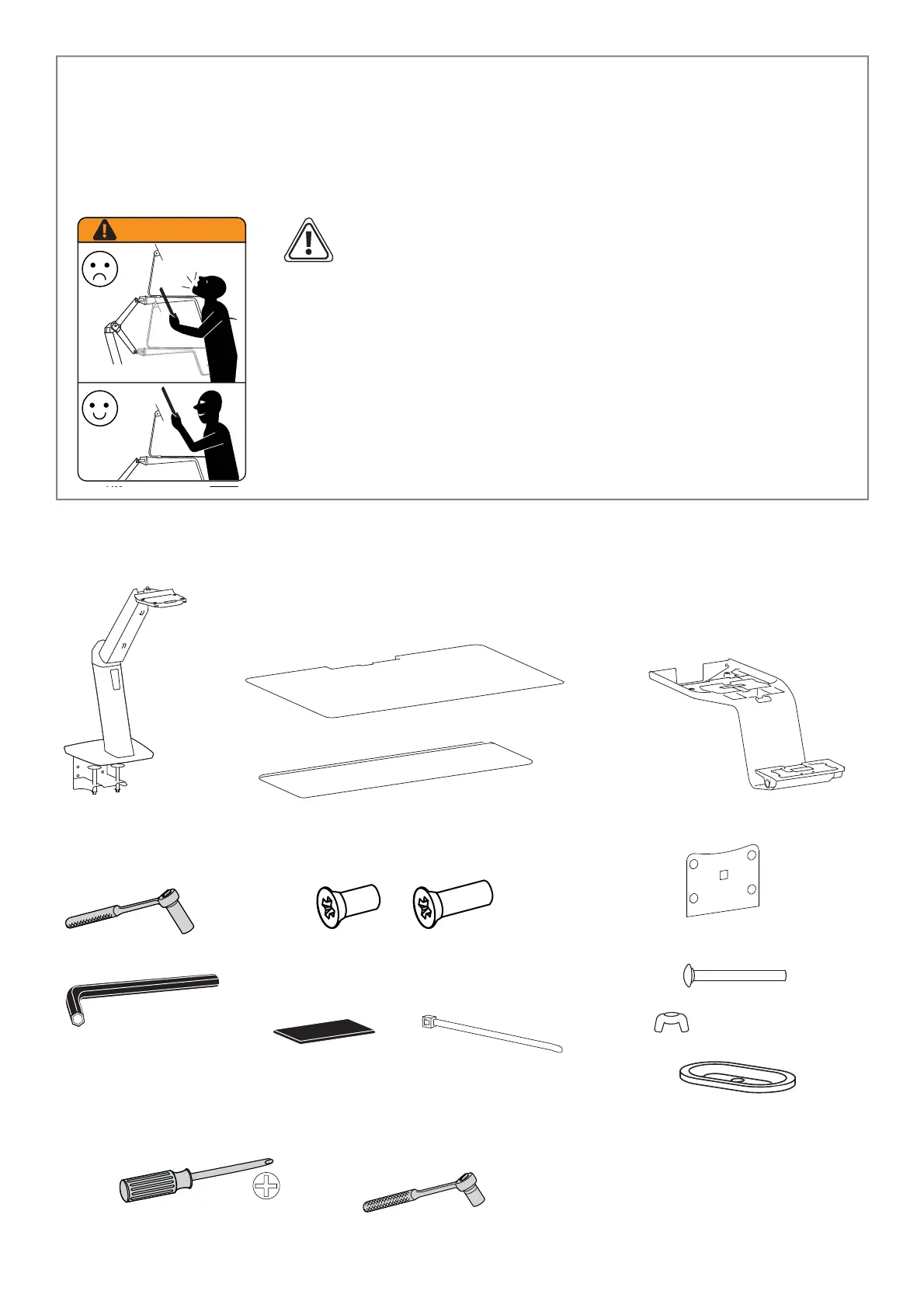
WARNING! Stored Energy Hazard: The arm mechanism is
under tension and will move up rapidly, on its own, as soon
as attached equipment is removed. For this reason, DO NOT
remove equipment unless the arm has been moved to the
highest position! Failure to follow this instruction may result
in serious personal injury and/or equipment damage!
WARNING
Components
Hardware
Tools Needed



 To Next Page
 Loading...