EasyManua.ls Logo

Erica Synths BASSLINE - User Manual

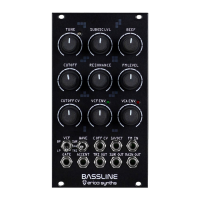
Erica Synths BASSLINE
6 pages
Print Icon
To Next Page IconTo Next Page
Loading...
GUIDE TO ASSEMBLY OF ERICA SYNTHS BASSLINE MODULE
If you are reading this, most probably, you are
about to build Erica Synths DIY BASSLINE module.
The module is 45mm deep, skiff friendly, has solid
mechanical construction and doesn’t require wiring.
Erica Synths Bassline is full analogue synth
voice module for ultimate acid basslines. It features
highly stable AS3340-based VCO with three
waveforms, a filter inspired by Erica Synths Acidbox
and unique feature transistor-based suboscillator.
Accent provides more expression to the bassline, by
adding volume and opening the VCF slightly.
The Bassline kit comes in three versions:
1) Set of 2 PCBs + rare ICs + mechanical parts (PCB
connectors and spacer),
2) Set of 2 PCBs + rare ICs + mechanical parts (PCB
connectors and spacer)+ panel,
3) Full kit.
FEATURES:
Full analogue circuit
Great 1V/oct tracking
Simultaneous Triangle, Square and Master
outputs
Accent
Transistor-based suboscillator
VCF and VCA decay envelopes
LP/BP VCF
External VCO FM and VCF cutoff CV inputs
SPECIFICATIONS:
Pitch range C0-C8
Audio output amplitude 10Vptp
CV amplitude (full span) -5V - +5V
Panel width 16HP
Module depth 45mm
Power consumption 80mA @+12V,
40mA@-12V
1
3
4
2
5 6
7
8
9
1
2
3
4
5
6
7
8
Set the initial tune of the VCO
Add some power to the sound! This is octave down transistor-based
suboscillaotr level control and effects Main output only
Set desired overdrive level! It effects Main output only
This is an external FM level attenuator. You can also do some self-
modulation by patching TRI OUT in to FM IN and increasing FM level.
Adjust VCF cutoff CV level! If nothing is patched in C OFF CV input, it
adjusts VCF envelope impact on the cutoff
Adjust the VCF cutoff envelope decay time
9
Adjust the VCA envelope decay time. Full CW setting will open
the VCA even the gate is not present
10 11 12 13 14
15 16 17 18 19
10
Select the VCF mode
11
Select the VCO waveform that is sent to the master output
12
This is an external CV input to control the VCF cutoff
13
This is the VCO 1V/oct input. It tracks well over 9 octaves
14
This is the VCO FM input
15
16
This is the Accent input. +10V CV will increase the volume and
open the VCF slightly to an expression to the bassline
17
18
19
This is the main output of the module
Big knobs are for VCF cutoff manual control!
Adjust the VCF resonance! The filter is the same as on DIY Polivoks
VCF, and it’s capable of extreme resonance sweeps.
This is the Gate input. It accepts gate from any sequencer and
sends it to the VCF and VCA envelopes simultaneously
These are additional VCO outputs, and they are not affected by VCF
and VCA. You can use them as additional sound sources that are in
tune with your bassline
Question and Answer IconNeed help?

Do you have a question about the Erica Synths BASSLINE and is the answer not in the manual?

Summary

Erica Synths Bassline Module Overview

Front Panel Control Descriptions

Detailed explanations for each of the 19 controls on the Bassline module's front panel.

Erica Synths Bassline Assembly

Step 1: Solder Resistors and IC Sockets

Instructions for soldering horizontal resistors, diodes, ferrite beads, and IC sockets on PCBs.

Step 2: Solder ICs and Capacitors

Guide to soldering IC sockets and capacitors, including resettable fuses on the Controls board.

Erica Synths Bassline Assembly Continued

Step 3: Solder Potentiometers and Transistors

Solder potentiometers, switches, jacks, and transistors on the Controls board and resistors on Main board.

Step 4: Solder Opamps and Electrolytic Capacitors

Solder transistors and opamps on the Main board, paying attention to polarity of electrolytic capacitors.

Erica Synths Bassline Assembly Further Steps

Step 5: Solder Trimpots and Pinheaders

Install trimpots and pinheaders for jumpers, and insert ICs onto the circuit boards.

Step 6: Solder Male Connectors

Solder male connectors onto the Main board at a 90° angle to the PCB.

Step 7: Solder PSU Socket and Capacitors

Solder the PSU cable socket and two electrolytic capacitors onto the Controls board.

Step 8: Connect and Solder Boards

Connect the Controls PCB and Main PCB together and solder the female socket.

Erica Synths Bassline Final Assembly

Step 9: Fix Spacer and LEDs

Secure the 11mm spacer with an M3x6 screw and insert LEDs without soldering.

Step 10: Final Connections and Knobs

Attach the front panel, solder LEDs, fix PCBs with screws, and install potentiometer knobs.

Erica Synths Bassline Calibration

Initial Setup and VCO Tuning

Connect PSU, set initial controls, and tune the VCO using a keyboard/MIDI-CV interface.

VCF Adjustment and Frequency Scaling

Adjust VCF cutoff and resonance, and fine-tune frequency scaling using specific trimpots.

Troubleshooting Suboscillator Issues

Addresses suboscillator malfunctioning due to pulse wave peaks, offering component modification.

Erica Synths BASSLINE Specifications

General IconGeneral
Oscillators1 VCO
MIDIMIDI In
KeyboardNo
TypeAnalog Synthesizer
WaveformsSawtooth, Square
CV InputsGate
Audio Output1/4" TS
Power Supply12V DC

Related product manuals