Need help?
Do you have a question about the Erica Synths Black Sequencer and is the answer not in the manual?
Configure overall operational parameters and sequencer behavior.
Assign gate probability per step for dynamic performance.
Arm channel muting for activation upon release.
Select and edit multiple steps simultaneously for sequence alteration.
Using the Black Sequencer as the master clock source for other modules.
View firmware/bootloader versions and perform module reboot.
Adjust OLED contrast, dimming, pop-up screens, and screensaver.
Configure bar follow, master reset, CV mute, clock out, and reset behavior.
Define default note value, gate length, and gate state for new sequences.
Calibrate sequencer CV outputs for optimal system integration.
Configure MIDI inputs, outputs, and messages for various functions.
Select internal, external, or MIDI clock source for the sequencer.
Assign inputs (MIDI/CV) to channels for various control functions.
The Erica Synths Black Sequencer is a high-end, feature-rich modular sequencer designed for contemporary modular synthesizers, offering unique functionality and superior quality. It serves as a master controller for many modular setups, providing intuitive, easy, and straightforward operation despite its extensive programmable parameters.
The Black Sequencer features four channels (CH1-CH4), each with CV, Gate, and Modulation outputs. It supports sequences of up to 64 steps per pattern, which can be chained into longer compositions in Song mode. Key functions include CV, Gate, and Modulation recording, MIDI IN and OUT capabilities, and Clock and Reset In/Out. Data input is facilitated by 16 encoders, and the module includes a built-in quantizer and a random pattern generator. It offers 16 banks of 16 pattern memory, with an SD card slot for backup and firmware updates.
Per-step adjustments are available for Note, Glide, Gate length, Modulation, Probability, Repeats, and Ratcheting. The sequencer supports microtonal tuning and adjustable shuffle per track. Each track can have independent timing divisions, multiplications, and lengths.
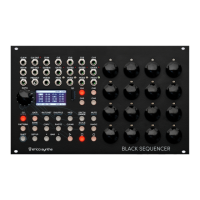
The Black Sequencer's interface is divided into five major parts: Inputs and Outputs, Encoders with pushbuttons, Channel selection buttons, Function buttons, and the Data encoder with an OLED screen.
Master Settings: The master BPM is set using the DATA encoder. Holding SHIFT and rotating the DATA encoder changes BPM by 10 BPM increments. Each channel has configurable divisions and multiplications of the master BPM, accessed via the SCALE button. The MASTER TRACK LENGTH, defining the number of steps before a pattern advances, can be set from 1 to 64 using the second STEP encoder.
Play Direction and Range: Per-channel play direction (Forward, Backward, Ping-Pong, Ping-Pong with repeats, Random) and step range (first and last step of the pattern) are configured via the DRCTN/RANGE button. The BAR FOLLOW function, which automatically advances the bar display for patterns longer than 16 steps, is engaged by holding SETUP and pushing the BAR> button. A TRACK OVERVIEW screen, showing play mode, active steps, and time divisions for all four tracks, is accessed by holding SHIFT and pushing DRCTN/RANGE.
CV Track Design: Quantization settings per channel are accessed by holding SHIFT and pushing the QUANT button. Users can select preset scales or design new microtonal scales. Notes per step are set by pushing the CV button and rotating the 16 encoders. Holding SHIFT and rotating encoders allows for octave changes. Notes can be previewed by holding the CV button and pushing a step encoder. Master Glide and Glide per step are adjusted by holding SHIFT and pushing CV/GLIDE. Notes can also be recorded from MIDI or CV/Gate keyboards.
Gate Track Design: Gate length per step is set by pushing the GATE button and rotating the 16 encoders. Gate lengths range from 0 (gate off) to 10 (full gate, merged with next step). Encoders also allow for merging contiguous gates, muting steps (gate becomes 0), and skipping steps.
Adding Variations: GATE PROBABILITY per step is assigned by holding SHIFT and pushing GATE/PROBAB. Probabilities can be set as fractions (e.g., 1/8, 1/4) or percentages (e.g., 10%, 50%). RACHETING per step, which plays a gate multiple times within the step length, is set via the RATCHET button. The ARPEGGIATOR PER STEP, applying quick arpeggios within a step, is accessed by holding SHIFT and pushing MOD/ARP. Shuffle per track, which slightly offsets some gates, is set via the SHUFFLE button and DATA encoder. MICROTIMING per step, for nuanced timing adjustments, is set by holding SHIFT and pushing SHUFFLE/TIMING.
Modulation Track Design: Each channel has a dedicated MODULATION OUTPUT. Modulation outputs can be configured as stepped voltages, slided step voltages, stepped voltages linked to notes, various envelopes (Decay, ASR, ADSR), LFOs (per step or synced/free running), and triggers. Configuration is done by holding SETUP and pushing MOD.
Managing Patterns, Banks, and Songs: The sequencer's memory is structured into PROJECTS (on SD card), BANKS (16 per project), PATTERNS (16 per bank, each with 4 tracks), and SONGS (up to 16 per bank, a chain of patterns). Patterns are saved by holding SHIFT and pushing the RECORD button. Projects are accessed by holding SHIFT and pushing PATTERN. Songs are designed by holding SHIFT and pushing BANK/SONG. PATTERN LINKING allows chaining multiple patterns to play sequentially.
Parameter Clear, Copy, Paste: All track information or specific settings can be cleared by holding CLEAR and pushing a track button or step encoders. All track information can be copied by holding COPY and pushing a track button. Information can be pasted to another track by holding PASTE and pushing the destination track button. Specific settings (CVs, Gates, Probabilities, etc.) can also be copied and pasted.
Channel Muting and Solo: Channels can be muted during performance by pushing MUTE and selecting channels. Holding SHIFT and pushing MUTE/SOLO allows for soloing a channel, muting all others. MUTE ARMING allows pre-selecting channels to mute when the MUTE button is released.
Magic – Parameter Randomization: The MAGIC button randomizes track information or parameter information within preset scales. Holding MAGIC and pushing a channel button randomizes all selected parameters for that channel. Specific parameters (e.g., CVs, Glide) can be randomized by holding MAGIC and pushing the corresponding function button. Randomization settings (e.g., octave range for CV) can be adjusted in the SETUP menu.
Performance Mode: Accessed by holding SHIFT and pushing MAGIC, performance mode allows transposing selected tracks by octaves (DATA encoder) or semitones (step encoders). The four bottom step encoders apply rolls to sequences with adjustable rates.
Step Selection / Multi-Edit: Holding the DATA encoder and pushing multiple step encoders activates selected steps for multi-editing. This allows changing parameters (e.g., pitch, gate length) for all selected steps simultaneously. Pre-designed step patterns can also be applied.
Sequence Rotation:
Holding SHIFT and pushing
CV, Gate, Mod, and MIDI Input Routing: External signals (keyboards, LFOs, etc.) can alter sequences. Input configuration is accessed via the SETUP menu. Inputs can be assigned to specific outputs (CV1-CV4, MOD1-MOD4) and configured for actions like OFF, FILL (replace notes), ADDFILL (add to notes), ADD (add to notes, ignoring gate), or THROUGH (pass directly to output).
CV, Gate, and Modulation Record: Sequences can be recorded from external MIDI or CV/Gate sources. Recording settings (SOURCE, MODE, MOD REC, NOTE QNT, GATE LEN, MONITOR, POP-UP) are configured in the RECORD setup menu (holding SETUP and pushing RECORD). Recording modes include OVERDUB, RECORD, INSERT, and FILL. Modulation recording automatically switches MOD output to SLIDED STEP MODULATION. Recording can be armed when the sequencer is stopped by pushing REC.
Synchronizing with Other Modules: The Black Sequencer can act as a master clock (outputting clock and reset signals via CLK OUT and RST OUT) or a slave unit (receiving clock via CLK IN or MIDI IN). Clock output rate (ppq) and reset output behavior (START or STOP) are configurable in the General Settings menu. MIDI synchronization uses B Type 3.5mm to DIN5 MIDI cables, transmitting MIDI clock and start/stop messages. Continuous MIDI clock messages can be enabled in MIDI SETTINGS.
Firmware Update: To update the firmware, power off the modular case, remove the SD card, copy the latest firmware file to the root directory of the SD card, and reinsert it. Upon powering on, the sequencer will automatically detect, erase, and upload the new firmware. Saved patterns remain unchanged.
Backup: Patterns can be backed up by copying the PROJECTS folder from the SD card to a computer.
Calibration: The Input and Output CALIBRATION menu allows calibrating the sequencer for optimal performance with specific VCOs. Factory calibration is 1V/oct.
Display Settings: The Display settings menu allows adjusting OLED screen contrast, dimming time (to prevent burn-in), pop-up screen visibility, and screensaver activation time.
Safety Instructions:
 General
| Brand | Erica Synths |
|---|---|
| Model | Black Sequencer |
| Category | Synthesizer |
| Language | English |

 To Next Page