ESI U22 XT
12
5. Control Panel under Mac OS X
This chapter describes the U22 XT Control Panel under Mac OS X.
After the installation, the panel can be found in your Applications folder. You can launch it in the
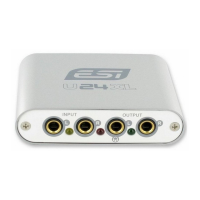
Finder via Go> Applications > U22 XT Panel. The following dialog appears:
The panel has the following functions and sections:
INPUT section: this section controls the input monitoring volume of the incoming signal from the
hardware. The pair of mono faders can be controlled together when the LINK function is enabled or
or individually when it is disabled – perfect for stereo signals. The Mute button the channel allows
you to mute the signal. A red Mute button indicates that the mute function is enabled. When
disabled, the button is gray.
OUTPUT section: this section controls the playback volume of the playback signal from your audio
applications. The pair of mono faders can be controlled together when the LINK function is enabled
or or individually when it is disabled – perfect for stereo signals. The Mute button the channel
allows you to mute playback. A red Mute button indicates that the mute function is enabled. When
disabled, the button is gray.


 To Next Page