10
Q Precautions when making connections
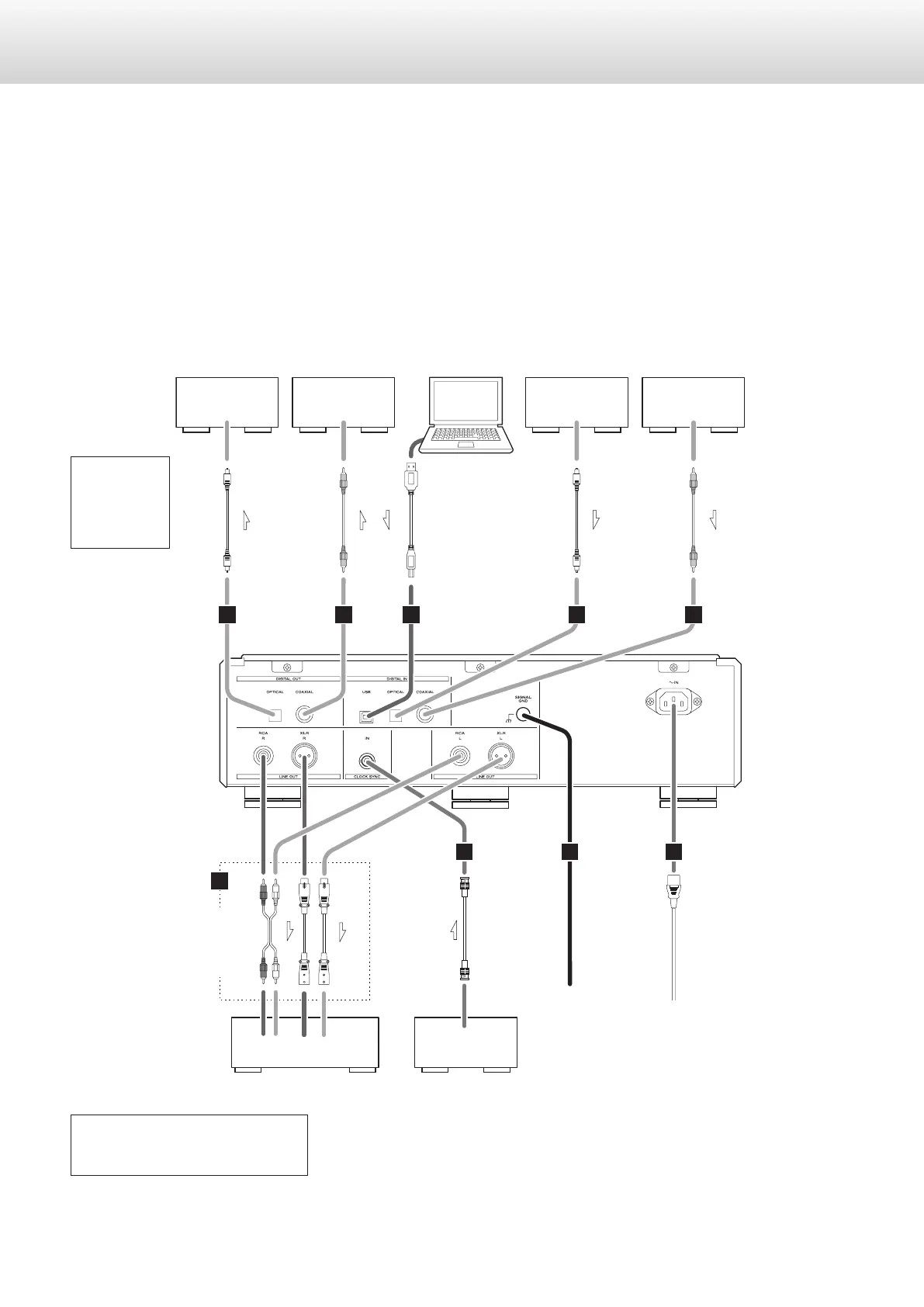
o Make all connection before plugging in the power cord.
o Carefully read the operation manuals of the other equipment and follow their instructions when connecting them.
Stereo amplier
Audio input
(LINE IN, etc.)
DIGITAL OUT
(OPTICAL)
Digital output
deviceComputer
DIGITAL OUT
(COAXIAL)
Digital output
device
E
F
A A
G
C CB
D
LLRR
Device that outputs clock
CLOCK SYNC OUT
DIGITAL IN
(COAXIAL)
Amplier or digital
recording device
(CD recorder, MD
deck, etc.)
Amplier or digital
recording device
(CD recorder, MD
deck, etc.)
DIGITAL IN
(OPTICAL)
Optical
digital cable
RCA coaxial
digital cable
RCA audio
cable
XLR cable
BNC coaxial cable
Included power cord
Wall socket
RCA coaxial
digital cable
USB cable
Optical
digital cable
Connect a
set of
cables of
one type
or the other.
Digital output
can be turned
on/off
(see p. 27).
The polarity of the XLR connectors can be
set so that either 2 or 3 is HOT (see p. 27).
Making connections


 To Next Page