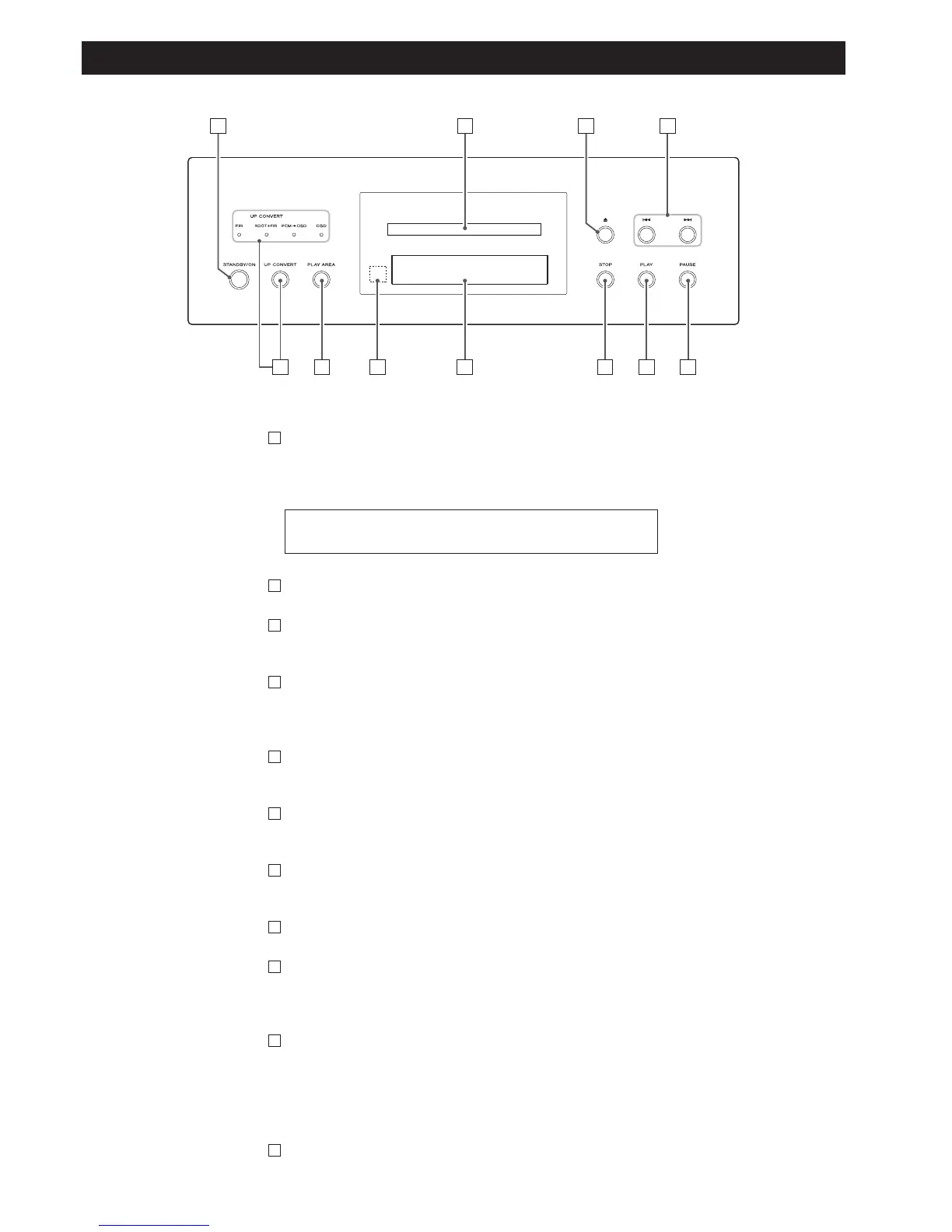
STANDBY/ON
Use this button to turn the unit on and standby.
The ring surrounding the button is red in the standby mode. It
turns blue when the unit is turned on.
Disc tray
OPEN/CLOSE
Use this to open and close the disc tray.
SKIP (.//)
Use these for skip operations. Pressing and holding these buttons
for more than a second changes the scanning speed.
PAUSE
Use this to pause playback.
PLAY
Use this to start playback.
STOP
Use this to stop playback.
Display
Remote control sensor
Receives signals from the remote control unit. Point the remote
control unit at this sensor when operating the remote control unit.
PLAY AREA
When playback is stopped, use this with DVD audio and Super
Audio CD discs to select the playback area.
Hold down this for more than two seconds to enter the setup
mode.
UP CONVERT
Use this button to convert the sampling frequency.
K
J
I
H
G
F
E
D
C
B
The equipment draws nominal non-operating power from the
AC outlet with its STANDBY/ON in the standby position.
A


 To Next Page