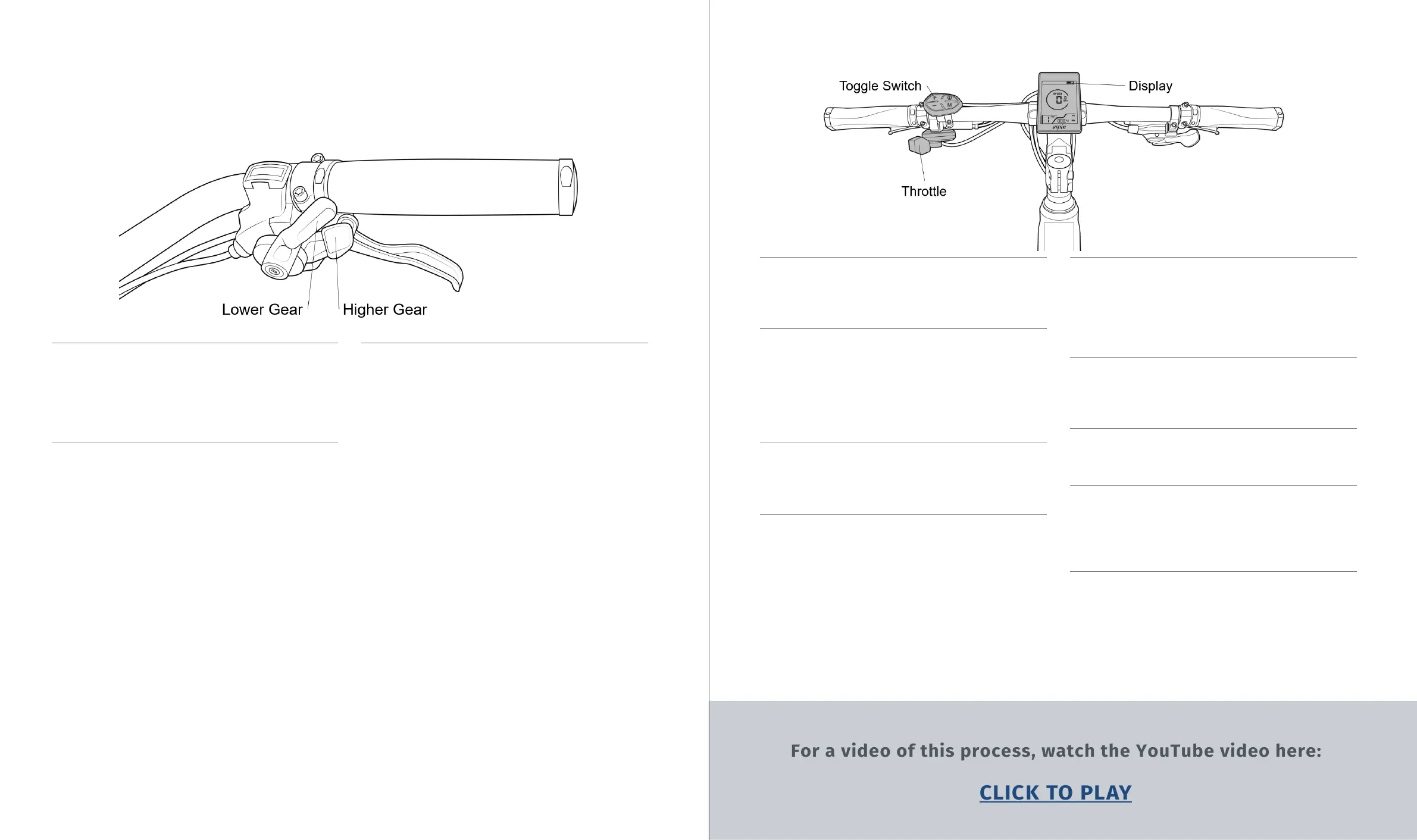
11 .1 The shifter is located on the right side
of the handlebar and has 2 levers, shown in
Figure 20. DO NOT shift the bike unless pedal-
ing, this can damage the shift line. Only shift
while pedaling.
11 .2 The high gear lever shifts the derailleur
into higher gears (smaller cogs). Pressing it
forward will make it click once and shift the
derailleur into a higher gear. If pedaling feels
too fast or easy, shift into a higher gear.
11 .3 The low gear lever shifts the derailleur
into lower gears (larger cogs). This lever has
a larger range of motion than the high gear
lever, and pressing it all the way forward will
make it click multiple times. Each click signi-
fies one lower gear. This larger range helps to
quickly shift into a lower gear if a hill is sud-
denly encountered. If pedaling feels too slow
or dicult, shift into a lower gear.
Figure 20
11 .4 The electrical controls are located on the
left side of the handlebar, and are highlighted
in Figure 21.
11 .5 The throttle is used for instantaneous
power, and the toggle switch is used to select
PAS levels, turn the lights on or o, activate
walk mode, turn on the USB charger, and
toggle through all of the display options and
settings.
11 .6 The display shows current speed, dis-
tance traveled, battery level, PAS level, and all
of the bike’s functions and settings.
11 .7 To turn the bike on, make sure the battery
is connected, locked, and turned on, then hold
the power button (I/O) on the toggle switch for
one second. When turning the bike on, it will
start in PAS 1. This is the slowest PAS level.
To select faster PAS levels, press the + button.
The fastest speed is PAS 5. For slower speeds
or to turn the PAS o with PAS 0, press the -
button.
11 .8 Whether using the throttle or PAS, the
motor can be instantly shut o by squeezing
either of the brake levers. The brake levers
have integrated motor cuto switches, the
wires for which come out of the lever next to
the brake line.
11 .9 To activate walk mode for walking the
bike uphill or up stairs, hold the - button. The
motor will kick in after a second and will keep
providing power until the - button is released.
11 .10 To turn the lights on, hold the + button
for one second. To turn the lights o, also
hold the + button for one second.
11 .11 To turn on the USB charging port, hold
the M button for one second. To turn it o,
also hold the M button for one second. The
USB port is on the front side of the display,
covered by a rubber cap.
For a video of this process, watch the YouTube video here:
CLICK TO PLAY
Figure 21
11 .12 To turn the bike o, hold the power but-
ton for one second. If the bike is not moving
and receiving no user inputs for 5 minutes, it
will automatically turn o. When o the bike
or walking it, ALWAYS either turn it o or set
to PAS 0.
11 HOW TO SHIFT GEARS AND O PERATE THE
PEDAL ASSIST SYSTEM (PAS)
18 19


 To Next Page