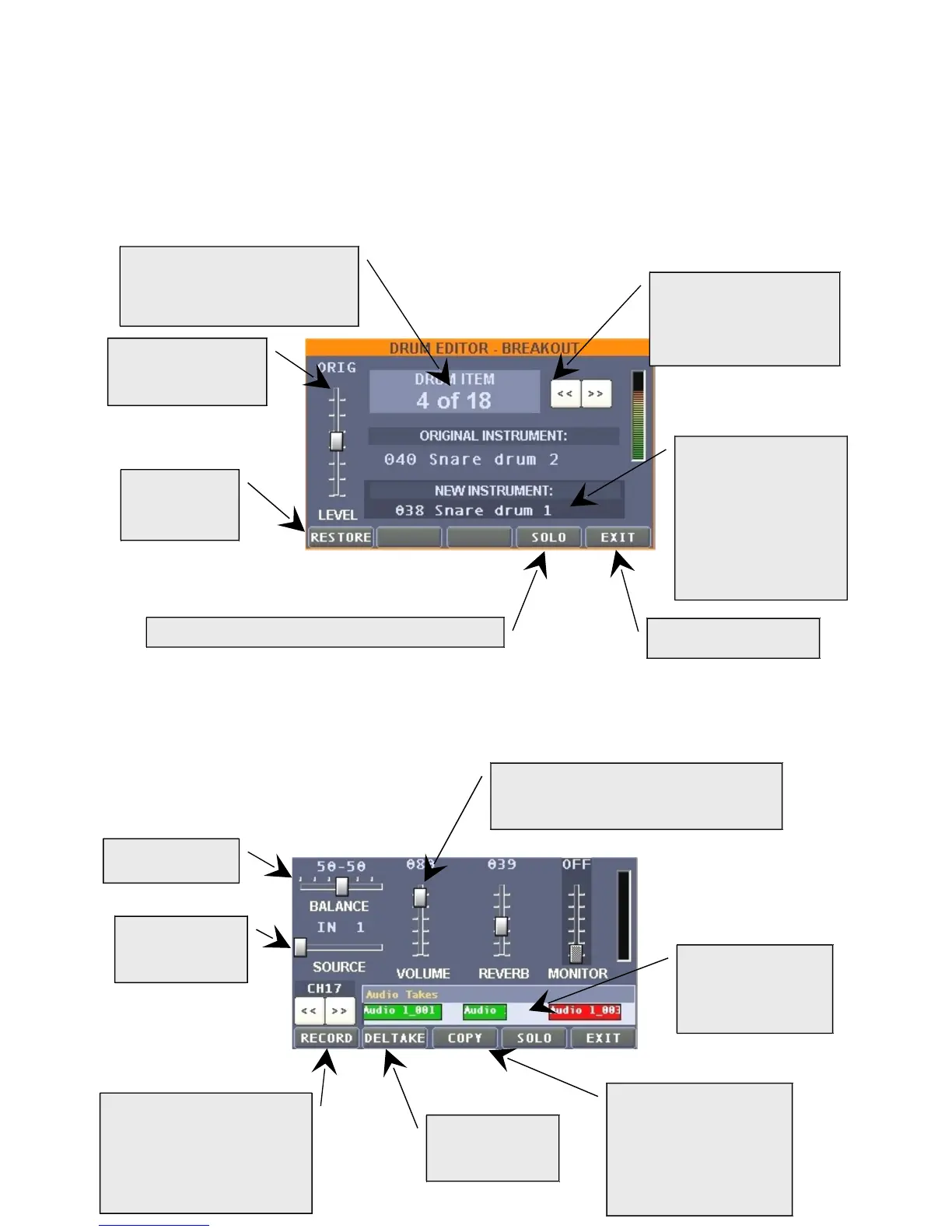
By selecting channel 10 the "MIDIOUT" button becomes "DRMEDIT", where it is possible to modify
velocity and replace single battery sounds within the drum kit in use.
Scrolling the channel, after the sixteenth one (the last MIDI) the window shows 8 more slider (from
17 to 24), corresponding to 8 traces, available audio for recording, in synch with a MIDI song
Velocity regulation of
single rhythmical
instrument.
To restore
parameters to
original value.
To modify the
rhythmical instrument
assigned. Highlight the
instrument's name and
apply the changes by
means of the
PAGE/VALUE knob
Scroll to select the single
rhythmical instrument in
the MIDI song in use.
To exit the window.
To exclusively listen to the selected channel.
By pressing this button (red
activated) the recording is
paused waiting for the start
of the MIDI song played
(Play)
To select one of
the 4 audio
sources
Audio trace volume. Following to the
right, regulation of reverb quantity and
Monitor level out
To cancel a
recording
segment
To copy the selected
segment (red) in another
trace (the copy within the
same trace will be
available in the future
software versions)
Space reserved to
view the recorded
audio segments
Number of rhythmical
instruments used in the selected
MIDI song


 To Next Page
 Loading...