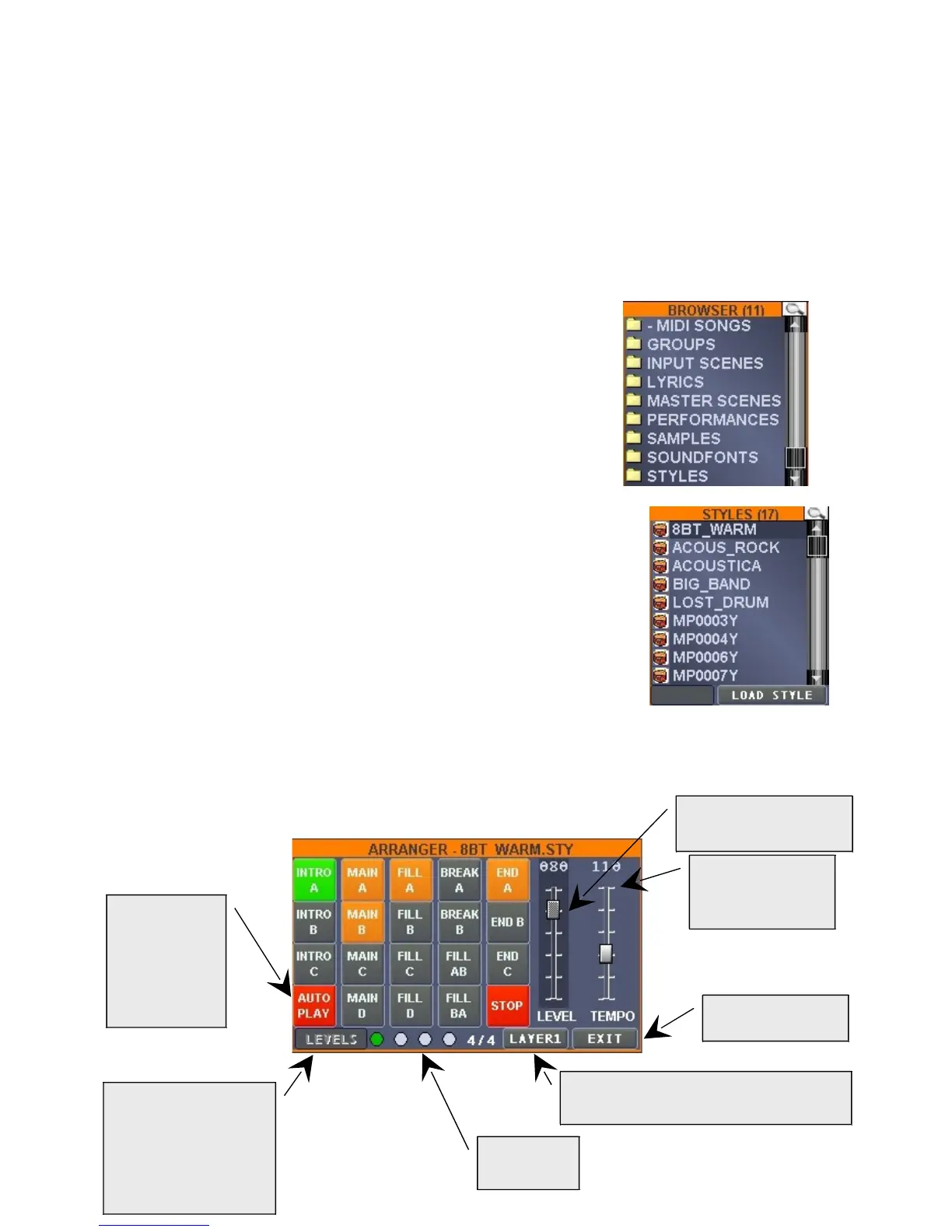
Button to
activate the
arranger by
means of a
connected
MIDI keyboard
Level regulation of
arranger's singular
instruments (function
currently not
implemented)
Arranger's independent
volume
Arranging
performance
speed
To exit the
arranger window
Layer from which the arranger receives
the input (harmonic information)
Rhythmical
scan
“LAYERS”, to access the window where it is possible to assign the keyboard portion to
which assign a particular instrument.
“EDIT” to access the window where it is possible to regulate volume and balance (panpot),
the effects (Reverb/Chorus), and the soundfont to be used for each single layer.
“SAVE” to save the “PERFORMANCE”. As in similar cases, the CONSOLE will
automatically activate itself to allow to record a name, in this case, to the PERFORMANCE
created.
“MUTE” to mute the selected layer.
“ARRANG” to access arranger functions, for which we will deeply describe the
characteristics.
In order to use the MatrixOne built-in arranger, it is necessary to,:
first, load a STYLE, then position yourself on the ALL SONGS
window (top left), and successively press the left cursor button
to access the BROWSER window.
Then scroll the various folders and access (by means of right cursor
key or touch screen) in the "STYLES" folder and load, by pressing the
"LOAD STYLE" button, one of the many preloaded MatrixOne styles.
As already previously mentioned the styles supplied are in the widely
known Yamaha™ format, ad it is possible to free download them
from internet.
Once a STYLE has been loaded, the arranger can function: please note that according to the style
loaded, more or less variations may be available.


 To Next Page
 Loading...