Back to the last of the 8 buttons of the bar, below left:
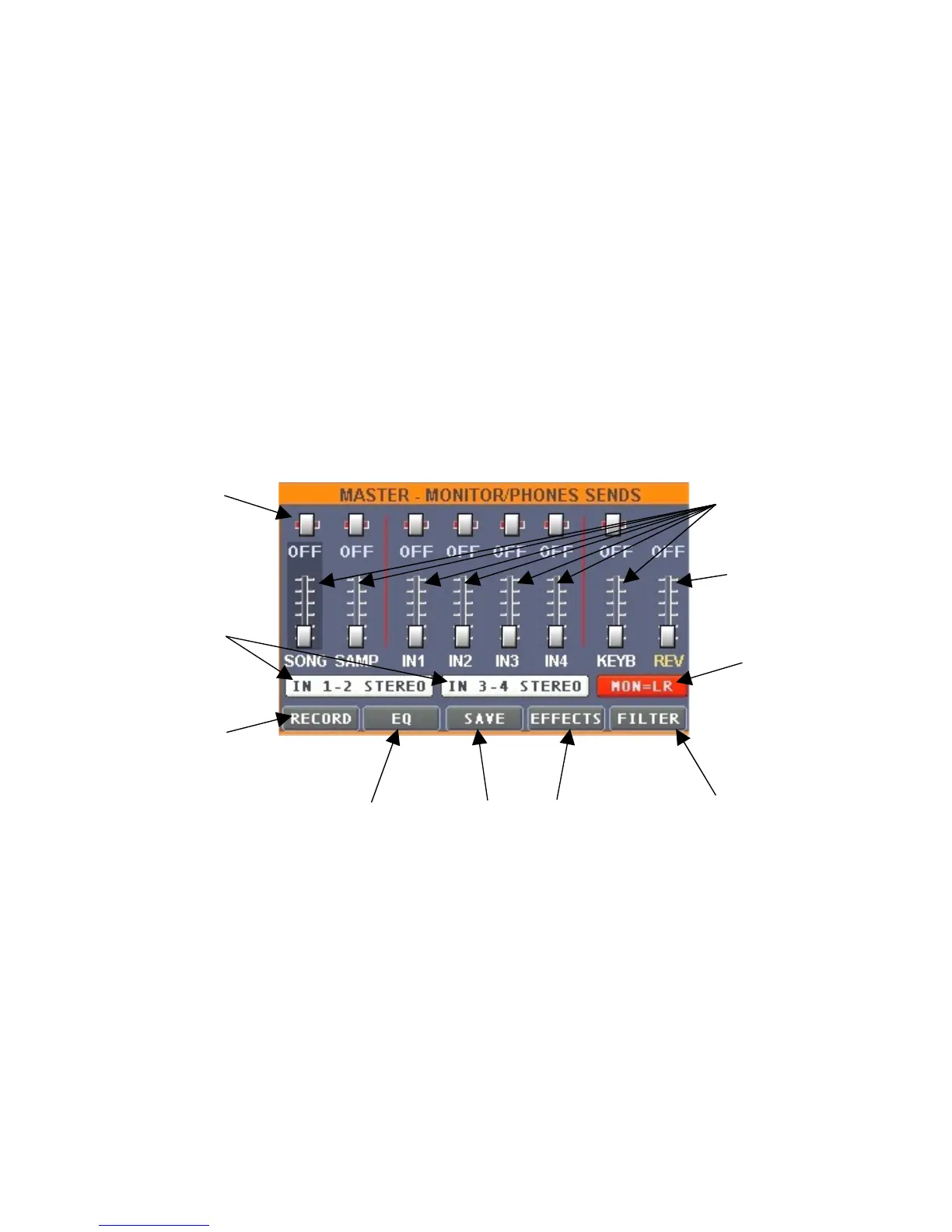
5) In this window it is possible to regulate the monitor and headphones sends of the 7 available
sound sources (the songs MIDI&Audio, the samples, the 4 analogical IN and the keyboard
eventually connected via MIDI), as well as the reverb level, allowing thus to difference and adapt to
your needs the principal output Left/Right, monitor send, eventually connected and headphones.
Other functions bound to this window are audio recording, output global EQ and effects.
The following window will appear after pressing the "MAST" button:
A L
I
B
H
C
D E F G
A. Balance (panpot) individual regulation for each sound source.
B. Buttons that determine if the input 1-2 are to be considered as 1 stereo channel or 2 mono.
The same for inputs 3-4. If the buttons are white, then the channels will be considered
singularly, if the buttons are red then the channels will be "linked", becoming 1 stereo
channel.
C. This button heads towards the panel dedicated to the recording of the audio signal on the
principal Left/Right outputs, allowing to record in real time your live performances; this is a
very requested function, which is seldom found on this type of units.
We explain this issue deeply, using the chart below.


 To Next Page
 Loading...