User Manual - Neptune Mini Filtering System
______________________________________________________________________________
V 1.2
- 8 -
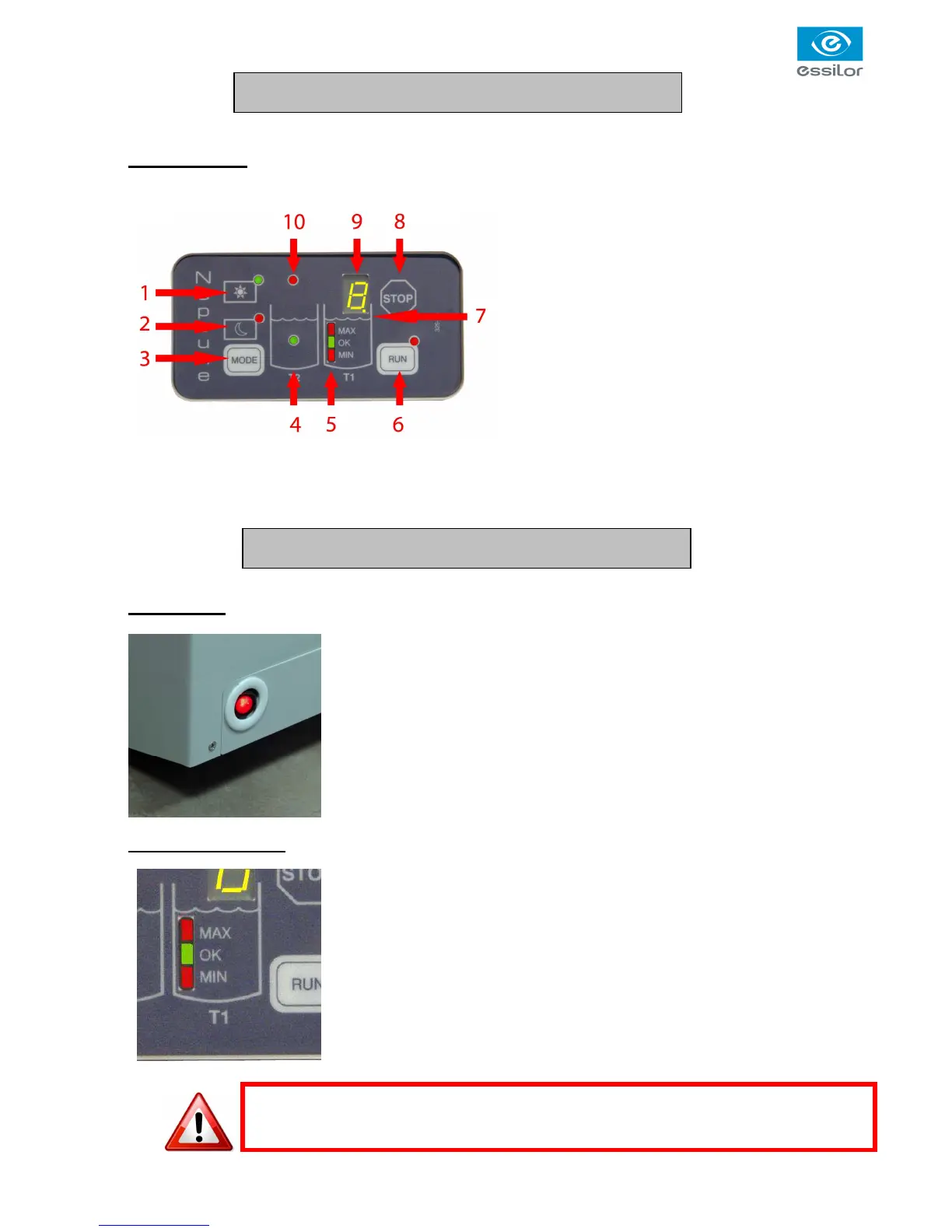
Control Unit
1. DAY mode switch and green LED indicator
2. NIGHT mode switch and red LED indicator
3. Inverter switch DAY/NIGHT
4. Filtering tank water presence green LED
indicator (T2)
5. Water level LED indicator in working tank (T1)
MIN - OK - MAX
6. RUN switch and red LED
7. Working tank water indicator
8. STOP switch
9. Cycle counter
10. ERROR LED
Operation
The master switch is located on the lower front side of the machine.
When pressed, all LED from the control panel will lit for initialisation. When
finished, only the DAY LED and the Water Level Indicator will remain lighted.
Water level control
Independantly from the selected mode, i.e. DAY or NIGHT, the T1 LED indicator
indicate the water level in the working tank
There are 3 positions:
1. Red upper LED: Too much water in the tank
2. Green middle LED: Water level is OK
3.
Red lower LED: Not enough water in the tank
Description
Use



 To Next Page