EN
eSTAR S23 has an internal radio antenna so that no headset is needed
to listen to the radio. To power ON/OFF the Radio, access FM Radio from
the main menu. By selecting Options, you have access to the following
functions:
- Automatic Search: to automatically search for radio stations
- Channel list:to manually browse saved channels
- Save: to save searched stations
- Manual search: for the manual search of radio channels
- Speaker: reproduces the radio with the speaker instead of the
headphones
- Background: keeps playing in background even after exiting from the
radio app screen
- FM Record: to record the current radio channel
- File list: List of recorded les
Use the UP and DOWN selection keys for volume.
Shortcuts: Menu > Settings > Phone Setting > Shortcut setting. UP
and DOWN selection keys can open some shortcuts; by default, the UP
selection key directly enters the Music Player, while the DOWN selection
key opens the alarm list.
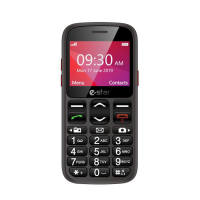
To access the Main Menu on your phone, press the selection key on the
top left:
- Messaging:to write and read SMS text messages
- Contacts:to manage and save contacts
- Calls Log: Missed Calls, dialled calls...
- Multimedia: Video player, Recorder
FM radio:
Main menu:


 To Next Page