5
respond to an incoming call simply by opening the ip. To set up the
answer mode select Settings > Call settings > Answer mode
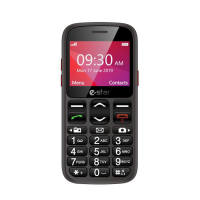
to make a call from the Home screen, select the desired number by
using thekeypad and then press the green call button. To end the call,
press the red end call key.
from the main screen, press the upper right selection key; this will
automatically open the Contacts. Scroll through contacts with the UP/
DOWN keys and press the green call button to call the desired contact.
from the main screen, press the green call key, the missed, received,
and outgoing calls will be automatically displayed.
Scroll with UP/Down keys and press the green call button when you
nd the number you want to call.
- FM Radio: to turn on and o the radio
- Settings: to customize your phone
- Tools: with My les, Calendar, Calculator, Alarm, STK..
- SOS: to enable and customize the SOS function
Answer an incoming call:
Making a call:
Call a number from the contacts:
Call anumber from the call log:
Select Menu > Contacts > Options > New, and choose to save the
number on the SIM or the Phone. Enter the name and the new
number, then press Save.
Add contacts to the Contacts:


 To Next Page