
 Need help?
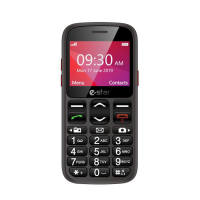
Do you have a question about the Estar S23 and is the answer not in the manual?
Instructions for inserting the SIM card into the phone.
Guide to inserting a micro-SD memory card for media functions.
How to turn the phone on/off and lock/unlock the keypad.
Steps for connecting the phone to a computer via USB.
How to insert the lithium-ion battery into the phone.
Procedure for charging the battery and audio feedback.
Recommendations for optimal battery care and charging environment.
Details on search, channel list, save, manual search, speaker, background, and recording.
Writing and reading SMS text messages.
Managing and saving contacts.
Accessing missed, dialled, and received calls.
Using the video player and recorder.
How to answer calls by opening the flip and setting answer modes.
Dialing numbers using the keypad and initiating calls.
Accessing and calling contacts via the contacts list.
Redialing numbers from the call history.
Saving new numbers and names into the phone or SIM card.
Assigning numbers to keys for quick dialing.
Checking available storage on phone and SIM card.
Activating spoken number announcement for each key press.
Composing and sending text messages.
Receiving and reading new text messages.
Turning on, searching, and pairing Bluetooth devices.
Using the SOS button for emergency calls and messages.
Notes on interruptions to SOS calls due to answering machines or voicemail.
Selecting ringtones for incoming calls and changing vibration modes.
Adjusting Date/Time, Language, Display, and restoring factory settings.
Device meets international guidelines for radio frequency exposure.
Explanation of SAR limits and factors affecting SAR values.
Important warnings regarding battery, opening the product, and environmental exposure.

 To Next Page
 General