3. Important Remarks - Please read this section first
We congratulate you to your purchase of an ESU ECoS Digital
Command Station. ECoS is a modern, intelligent model train
control system designed with the future in mind. In a short
time you will experience how easy it is to run trains and other
devices on your layout with ECoS and to discover new und-
reamt-of possibilities for your hobby thanks to a unique variety
of functions. Due to new functions you will quickly find out
how easy it is to run your model trains with your ECoS.
This manual will guide you step by step through the multitude
of possibilities of ECoS. However, have one request:
Please read this manual carefully prior to initial operation. Alt-
hough ECoS is robustly constructed there is the risk of damage
due to incorrect wiring. If in doubt, avoid any „costly” expe-
riments!
•ECoSisonlyintendedfortheusewithelectricalmodeltrain
layouts. Never operate ECoS without paying attention and
never use it for controlling devices designed for transporting
persons.
•ECoSisnotatoy. Make surethatchildrenusethisdevice
only when adults are present.
•OnlyusethepowersupplyprovidedforECoS:Othertrans-
formers may lead to reduced output or in extreme cases to
damage of the command station.
•Usethe powersupply providedwith ECoSfor the energy
supply for ECoS only and not for any other household ap-
pliances.
•Neveruse Y-adaptersin order to provide power to other
devices for your model trains! An unintended connection to
ground could lead to damage or destruction of your ECoS!
•Check the power supply regularly for damage on the
housing or the mains cable. Damaged parts may not be
used under any circumstances! Do not attempt to repair the
power supply! This may be fatal!
•Assureadequate ventilation of the power supply. Do not
install in furniture without sufficient air circulation since this
could lead to overheating or fire!
•ECoSmayonlybe operated withthe devicesdescribed in
this manual. Any other use as described here is not permit-
ted.
•Only connect devices intended for this purpose to ECoS.
Even if other devices (also from other suppliers) may have
the same plugs and sockets does this not automatically in-
dicate that such devices may be operated with ECoS.
•Adheretothewiringdiagramsshowninthismanualwhen
connecting your layout. Other circuitry could lead to dama-
ge of ECoS.
•Donotdropyour ECoScommand stationor subjectit to
mechanical impact or vibrations. Such rough treatment
could cause breakage of components within the device.
•Neversupportyourselfonthetouchscreenorsitonyour
ECoS.
•Themonitorwithintegraltouchscreenisaprecisionpart.
Press it only lightly with your finger or the supplied peg (sty-
lus). Never use hard or pointed objects to avoid un-repaira-
ble damage to the touch screen.
•NeverexposeyourECoStorain,humidityordirectsunlight.
In case of high temperature variations (e.g. when you take
your ECoS from the cold car to your comfortably heated
house) please wait for a few hours until the device has ad-
justed to the temperature before switching it on.
•WhenusingECoSoutsideyoumustprotectitfromtheele-
ments under all circumstances! Only keep ECoS outside as
long as you run trains and avoid temperatures below 8°
Celsius or above 30° Celsius.
•Donotuseanyaggressivechemicals,cleaningsolutionsor
solvents for cleaning ECoS. Never use liquids or spray for
cleaning the monitor. Instead use a clean slightly (!) moist
cloth and only when ECoS is switched off.
•DonotattempttoopenECoS.Inappropriatehandlingmay
lead to damage of the command station.
3.1. What does M4 mean?
At some points in this catalog you will notice the term „M4“
for the first time rightly wonder what this might mean.
This question can be answered quite simply: from 2009 for-
ward, M4 is the name data protocol that was chosen by ESU
to be implemented in their decoders. Decoders with the M4
protocol are one hundred percent compatible with command
using mfx®. At such stations (e.g. Märklin® Central Station®)
they will be recognized automa-
tically and all playing functions
are available just like when
using mfx® other hand, our
ESU command stations using
M4 will recognize all (Märklin®
and mfx® decoders without
any restrictions and will still
work without any problems.
the (mutual) inventor of mfx®
we can assure you of this. In
short: the technique stays the
same, only the name has been
changed.
4. Introduction – What can ECoS do?
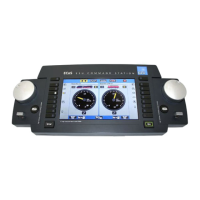
ECoS is a state-of-the-art complete digital control system for
model trains of all gauges. ECoS combines several devices in
one unit and a shapely body:
•A multi-protocol digital command station. Suitable for easy
mixed operation of mobile and stationary decoders suitable for
Motorola®, DCC, M4 and Selectrix® protocols.
•Largehigh-resolutionTFTcolourdisplaywithtouchscreen.It
serves for displaying information in plain text and very easy
menue-guided operation.
•Twoergonomic cabswith easyto gripthrottleknobs, 4-way
joystick and 9 function buttons each.
•Anintegralboosterwithupto4Ampereoutputforsupplying
„digital power” to your the tracks of your layout. A feedback
decoder as per the latest NMRA DCC standard („Bi-directional
Communication, RailCom®) is supplied as an integral part.
•SocketsforconnectingexternalboosterscompatiblewithDCC
or Märklin® 6017. Simply continue to use your own boosters.
•Onesocket forwiring theprogrammingtrack. With this you
can read out and program your mobile decoders independent
from the layout suitable for DCC, Selectrix® and programmab-
le Motorola®-decoders (e.g. ESU LokPilot® mfx®, LokSound®
mfx®).
•Acomputerinterface(10MBitEthernetLAN,RJ45)allowsyou
to download software updates, save and restore your configu-
ration as well as controlling your layout with a PC (with the aid
of dedicated software by several suppliers).
•ECoSlinkhigh-speed bus.Youmay connect upto 128 other
devices to ECoSlink. Other handheld (wireless) controllers,
boosters, bus distributors or feedback decoders, they all will
be detected automatically once they are plugged in: this is true
„Plug & Play“.
•s88-feedbackbus.ThispopularfeedbacksystembyMärklin®
enables you to control routes or to automate train movements
„shuttle train (shuttle trains).
•ECoSniffer-input. The port for any DCC resp. Motorola®-
capable, already available digital command stations: Continue
to use your favourite handheld controllers and accessory key-
boards – not a problem with ECoS.
•TheECoSlotmoduleexpansioncompartmentallowsupgrading
of ECoS with new components at a later stage, e.g. a receiver
module for the ECoSControl Radio handheld throttle.
All above mentioned parts and components enable you to run
your trains with never before imagined comfort and ease. You
may fully focus your attention on your trains while ECoS takes
care of the details like a good co-pilot. And here are all the
things you can do with ECoS:
•Runlocomotives:ECoShandlesupto16384locomotivesand
stores the name, a symbol, the function buttons and their cor-
responding symbols, address and data format. As from now
on you will call up your locomotives by their name and do not
have to remember address numbers any longer!
Introduction - What the ECoS can do


 To Next Page