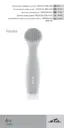
IV.DEVICEANDACCESSORIESDESCRIPTION(picture1)
A–IPLepilator
A1 – ON./OFF button./flash intensity adjustment
A2 – light activation button
A3 – air vent grate
A4 – air intake grate
A5 – device socket
A6 – light-signalling of scanning
B–LCDdisplay
B1 – marking of placed attachment
B2 – set flash intensity
B3 – remaining amount of flashed (longevity) of the attachment
C–IPLattachments
C1 – hair removal attachment (HR); (order code ETA834700010)
C2 – skin rejuvenation attachment (SR); (order code ETA834700020)
C3 – application window with protection filter
C4 – skin sensor
D–Safetyeyewear(obj. kód ETA834700030)
E–Adapter
V.INSTRUCTIONFORUSE
PREPARINGFORUSE
To achieve optimal results, it is advisable to pre-treat the areas you wish to use the device on.
A)Pre-treatmentoftheskinontheareatobetreated
1) Remove hair on the surface of the area in usual way (e.g. by shaving); if you have been
recently epilated by a method including root removal, before using IPL, wait until the
hair regrows. Using IPL technology on the areas, which are not hair-free, may result
in undesired effects. e.g. burning of hair accompanied by smell, or contamination or
damage to the application window.
2) Wash the skin, make sure it is free from any cosmetic products, perfumes etc. and let
it dry.
3) Check, and, if needed, clean the application window with protection filter C3.
It must not be contaminated with caught hairs, dust or any other impurities.
B)Settingthelightintensity
The device provides 5 different pulsed light intensities. The IPL method is more effective
in higher intensity settings. However, individual specifics of each person need to be
considered in accordance with the rules/warnings given in the instructions. If you have
darker skin tone, use lower intensity setting (see part “Skin type” above). As well, if you
experience any discomfort or pain in any part of your body, reduce the intensity.
After switching on the device, you can change the pulsed light intensity by pressing A1
button. The degree set is displayed by respective number of lines B2 on the display B.
38
GB
/ 71


 To Next Page