ETC Installation Guide
Dual Tech Occupancy Sensor
Power Up
All EchoConnect terminations in the system must be made before applying
power to the system and sensor. When the sensor is powered up, the PIR and
acoustic detection LEDs illuminate for one minute for calibration and warm-
up. Both the PIR and acoustic detection features of the sensor will
automatically adjust the sensitivity threshold to eliminate nuisance tripping.
During this time configuration is not allowed and no events are triggered.
Configuration
Basic
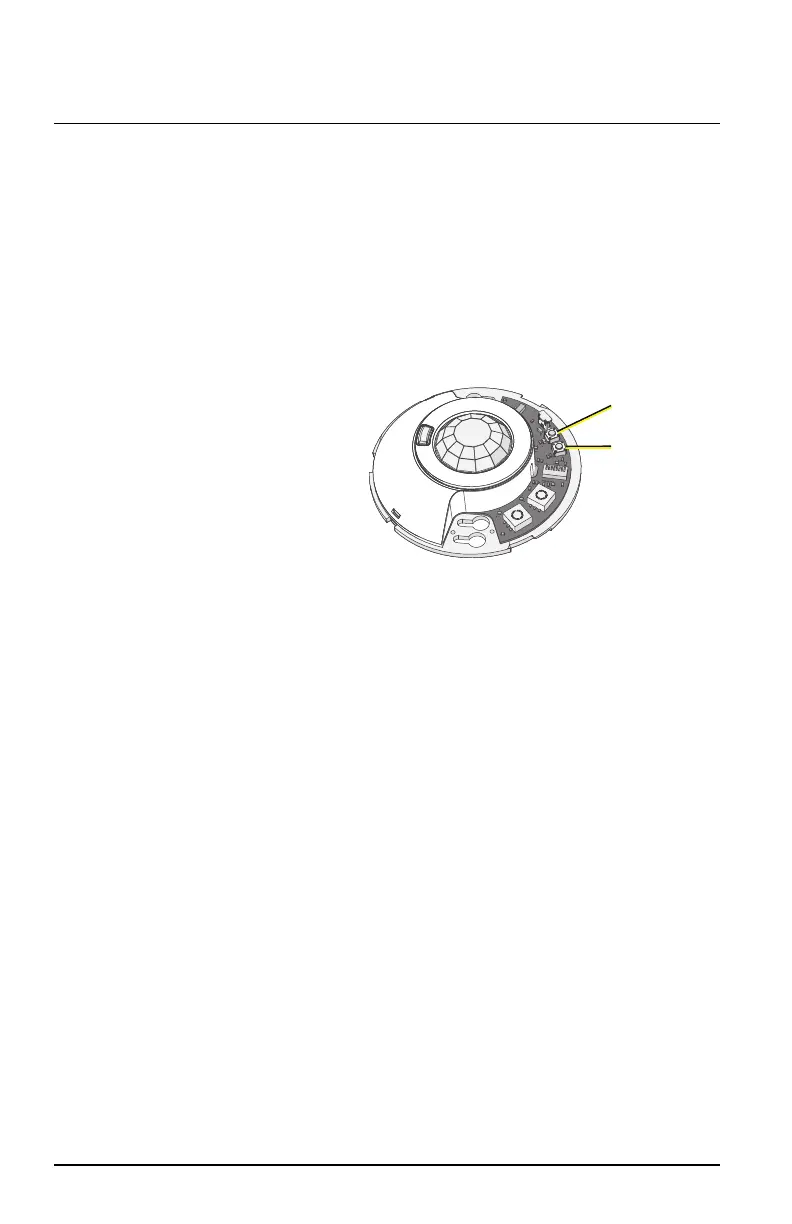
MODE button
and LED
AUXILIARY
button
and LED
A sensor that is set for Basic
configuration mode (DIPswitch
2 set to Off) can be further
configured locally using the
other available DIPswitch
settings, and the [MODE] and
Auxiliary [A] buttons and their
associated LEDs. See
Preset on
the facing page
.
Custom
A sensor that is set for Custom configuration mode (DIPswitch 2 set to On)
can be customized using the EchoAccess App.
For more detailed information about custom configuration options available
using EchoAccess, see the EchoAccess App integrated help system.
Dual Tech Occupancy Sensor Page 8 of 12 ETC


 To Next Page