EasyManua.ls Logo

ETC E-DOC-C-LR - User Manual

ETC E-DOC-C-LR
12 pages
Print Icon
To Next Page IconTo Next Page
Loading...
ETC Installation Guide
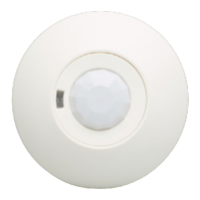
Echo Dual Tech Ceiling-mount Occupancy Sensor
Corpora te He a dqua rters Middleton, WI, USA +1 608 831 4116
London, UK +44 (0)20 8896 1000 Holzk irc he n, DE +49 (80 24) 47 00-0
Rome , IT +39 (06) 32 111 683 Hong Kong +852 2799 1220 P a ris, FR +33 1 4243 3535
Webetcconnect.comSupportsupport.etcconnect.com
Conta ctetcconnect.com/contactETC © 2020 Electronic Theatre Controls, Inc.
Product information and specifications subject to change. ETC intends this document
to be provided in its entirety. Trademark and patent info:etcconnect.com/ip
71 8 6 M 2 1 8 3 Rev B Released 2020-12
Overview
The Echo Dual Tech Ceiling-mount Occupancy Sensor uses passive infrared
(PIR) technology and acoustic detection to provide reliable occupancy and
vacancy sensing for lighting control.
The ceiling-mount sensor offers 360 degree coverage with optimized lens
options to accommodate small spaces, large spaces, and spaces with high
ceilings.
Model Coverage m
2
Coverage ft
2
E-DOC-C-SR
SmallRoom
41.8m
2
at2.4m 450ft
2
at8ft
74.3m
2
at 6.7m 800ft
2
at 12ft
E-DOC-C-LR
LargeRoom
167m
2
at 2.4m 1,800ft
2
at 8ft
279m
2
at 6.7m 3,000ft
2
at 12ft
E-DOC-C-HC
HighCeiling
28m
2
at 2.4m 300ft
2
at 10ft
650m
2
at 12.2m 7,000ft
2
at 40ft
Field-installed lens masks are provided to allow customized detection fields
for each sensor lens type.
Custom Configuration
This document guides you through the installation and local DIP switch setup
of the sensor. For more detailed information about custom configuration
options available using EchoAccess, see the EchoAccess App integrated help
system.
Note:
To use the configuration settings applied using EchoAccess,
DIP switch 2 must be enabled. See DIP Switches on page7.
Question and Answer IconNeed help?

Do you have a question about the ETC E-DOC-C-LR and is the answer not in the manual?

Summary

Overview

Custom Configuration

Prepare for Installation

Compliance

Environment

Ambient

Specifies operating temperature and humidity limits for indoor commercial use.

Location

Provides guidance on sensor placement to ensure optimal detection and avoid interference.

Wire Specification

Supplies

Installation

Junction Box or Surface Installation

Soft Ceiling Tile Installation

Settings

Set Space and Address

DIP Switches

Enable;Disable Custom Config Mode

Configures sensor for local DIP switch settings or EchoAccess App control.

Vacancy Timeout

Sets the delay before the sensor takes action after no movement is detected.

Detection LEDs

Controls whether occupancy detection LEDs illuminate when movement is detected.

PIR Only Mode

Disables acoustic detection technology, relying solely on PIR for sensing.

Restore to Defaults

Resets the sensor to its factory default settings when power is cycled.

Power Up

Configuration

Basic Configuration

Describes local configuration using DIP switches, MODE, and Auxiliary buttons.

Custom Configuration

Explains customization via the EchoAccess App when DIP switch 2 is set to On.

Preset

Operation

Dual Technology Logic

Explains the logic when both PIR and acoustic detection are used for occupancy.

PIR (only) Detection Logic

Outlines the logic when acoustic detection is disabled, using only PIR.

Vacancy Timeout & Grace Period

Defines the vacancy timeout duration and the subsequent grace period.

Auto Vacancy Timeout

Walk Test

Lens Masking

Sensor Coverage

Summary

Overview

Custom Configuration

Prepare for Installation

Compliance

Environment

Ambient

Specifies operating temperature and humidity limits for indoor commercial use.

Location

Provides guidance on sensor placement to ensure optimal detection and avoid interference.

Wire Specification

Supplies

Installation

Junction Box or Surface Installation

Soft Ceiling Tile Installation

Settings

Set Space and Address

DIP Switches

Enable;Disable Custom Config Mode

Configures sensor for local DIP switch settings or EchoAccess App control.

Vacancy Timeout

Sets the delay before the sensor takes action after no movement is detected.

Detection LEDs

Controls whether occupancy detection LEDs illuminate when movement is detected.

PIR Only Mode

Disables acoustic detection technology, relying solely on PIR for sensing.

Restore to Defaults

Resets the sensor to its factory default settings when power is cycled.

Power Up

Configuration

Basic Configuration

Describes local configuration using DIP switches, MODE, and Auxiliary buttons.

Custom Configuration

Explains customization via the EchoAccess App when DIP switch 2 is set to On.

Preset

Operation

Dual Technology Logic

Explains the logic when both PIR and acoustic detection are used for occupancy.

PIR (only) Detection Logic

Outlines the logic when acoustic detection is disabled, using only PIR.

Vacancy Timeout & Grace Period

Defines the vacancy timeout duration and the subsequent grace period.

Auto Vacancy Timeout

Walk Test

Lens Masking

Sensor Coverage

ETC E-DOC-C-LR Specifications

General IconGeneral
ConnectivityUSB
Light SourceLED
TypeElectronic Documentation Camera
CompatibilityWindows and Mac
FocusAuto