12
2.Thesetupinstructionoflocalwebpage
TheMainmenugroupoptionsoflocalwebpage
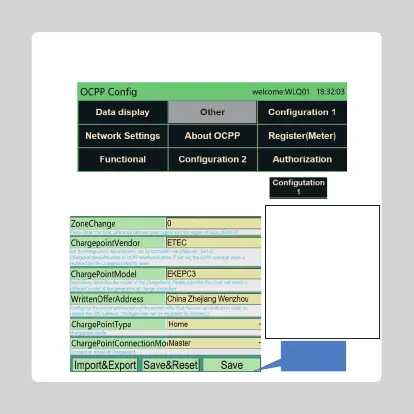
Step1:SettheinformationabouttheController
Iftheparametersare
completed,pleaseclick
thisbutton.
Ifthetimeisdifferentbetween
thefinalplatformyouconnected
andyourlocalplace,pleaseenter
thetimedifferencehere.
Thistextisallowedtochange.
Thistextisallowedtochange.
Thistextisallowedtochange.
Ifyourchargingpileisnotconnectedto
anetworkorback-endAPP.Please
selectthisoptionas:Home,otherwise
itwillbepulic.
Selectthecontroller'sworkmode:
MasterotSlave



 To Next Page