14
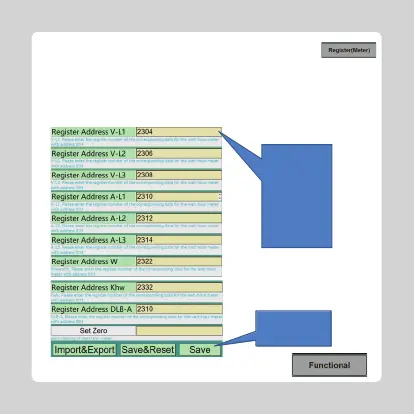
Step4:Settheregisteraddressforaccessingtothemeter.
IfthisisanADL400meter,
enter2304,2306,2308,
2310,2312,2314,2322,
2332,2310.IftheSDM63
type0meterisentered:
0,2,4,6,8,10,52,342,
10.Forothertypesof
meters,pleasereferto
theinstructionmanual
ofthemeteryouselected.
Iftheparametersare
completed,pleaseclick
thisbutton.
Step5:Setthebuttonforfunctionsrelatedtothechargingpile.
Illustrate:Allammeterswiththefollowingfunctionsaresupported:1)RS485
communicationinterface,communicationprotocol:Modbus-RTU.9600,n,8,1.
2)Theaddressoftheelectricitymeterissetas01H(electricitymeterformetering)and
02H(totalcircuitmeterforcurrentcollectionforDLBfunction).
3)Thedatatypeoftherequiredregisteris:4-bitfloatingpoint.



 To Next Page