EasyManua.ls Logo

ETEK Optima - 2. Rear Panel; Power Supply Lead Socket and Fuse Holder; Out (Balanced)

Default Icon
18 pages
Print Icon
To Next Page IconTo Next Page
To Previous Page IconTo Previous Page
Loading...
F""'__
I
2.
REAR
PANEL
1
2
3
4
5
B
L
I
_
'="
or
Ii
'5'
or
_
_-I
I
—_
i
1-4.1
1i
Z
-KI
L-
'-'
*-‘.96
I.
I_It_I
.Q.®j__llHI®Q.
B7
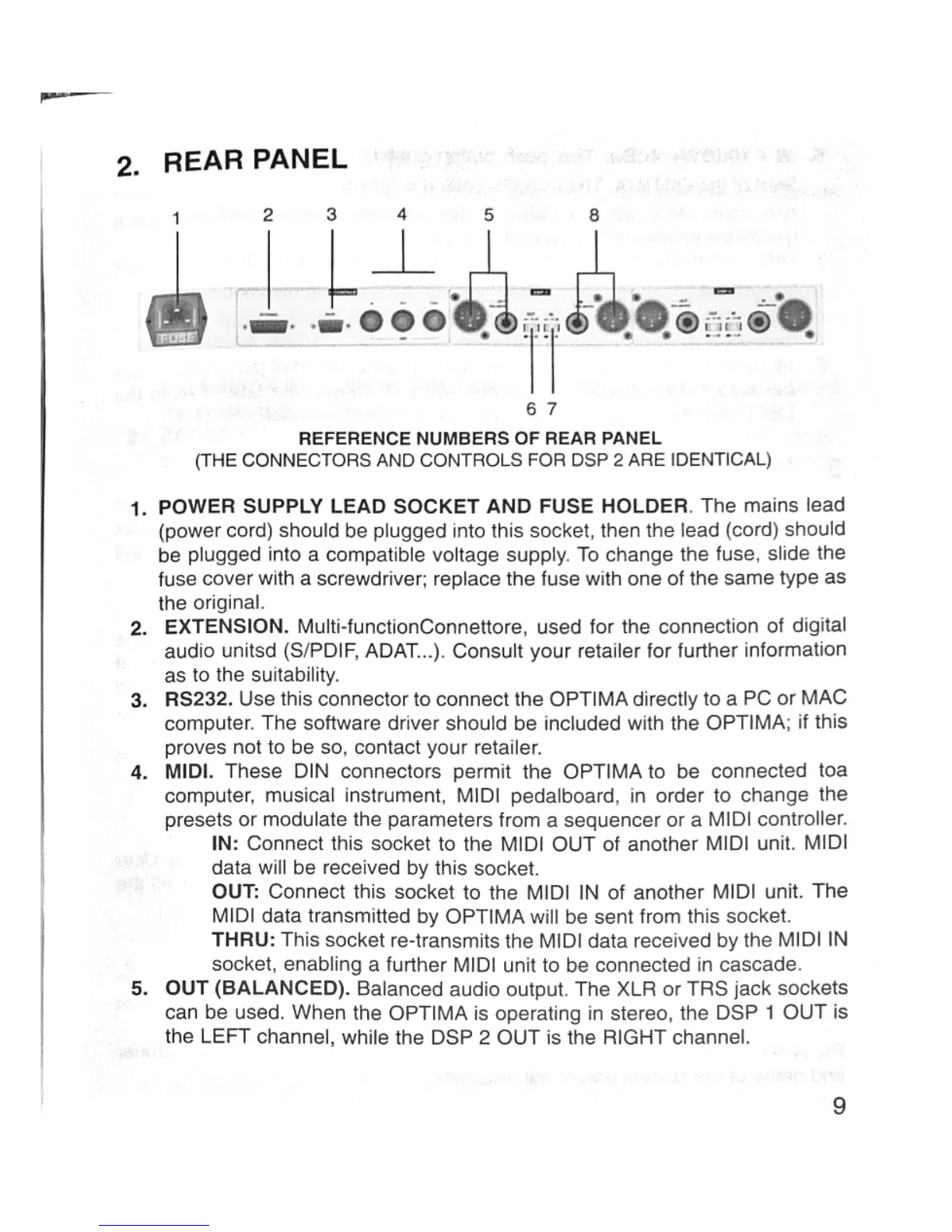
REFERENCE
NUMBERS
OF
REAR
PANEL
(THE
CONNECTORS
AND
CONTROLS
FOR
USP
2
ARE
IDENTICAL)
POWER
SUPPLY
LEAD
SOCKET
AND
FUSE
HOLDER.
The
mains
lead
(power
cord)
should
be
plugged
into
this
socket,
then
the
lead
(cord)
should
be
plugged
into
a
compatible
voltage
supply.
To
change
the
fuse,
slide
the
fuse
cover
with
a
screwdriver;
replace
the
fuse
with
one of
the
same
type
as
the
original.
EXTENSION.
Mufti-functionConnettore,
used
for
the
connection
of
digital
audio
united
(Sr‘PDlF,
ADAT...).
Consult
your
retailer
for
further
information
as
to
the
suitability.
RS232.
Use
this
connector
to
connect
the
OPTIMA
directly
to
a
PC
or
MAC
computer.
The
software
driver
should
be
included
with
the
OPTIMA;
if
this
proves
not
to
be
so,
contact
your
retailer.
MIDI.
These
DIN
connectors
permit
the
OPTIMA
to
be
connected
toa
computer,
musical
instrument,
MIDI
pedalboard,
in
order
to
change
the
presets
or
modulate
the
parameters
from
a
sequencer
or
a
MIDI
controller.
IN:
Connect
this
socket
to
the
MIDI
OUT
of
another
MIDI
unit.
MIDI
data
will
be
received
by
this
socket.
OUT:
Connect
this
socket
to
the
MIDI
IN
of
another
MIDI
unit.
The
MIDI
data
transmitted
by
OPTIMA
will
be
sent
from
this
socket.
THRU:
This
socket
re-transmits
the
MIDI
data
received
by
the
MIDI
IN
socket,
enabling
a
further
MIDI
unit
to
be
connected
in
cascade.
OUT
(BALANCED).
Balanced
audio
output.
The
XLR
or
TRS
jack
sockets
can
be
used.
When
the
OPTIMA
is
operating
in
stereo,
the
DSP
1
OUT
is
the
LEFT
channel,
while
the
DSP
2
OUT
is
the
RIGHT
channel.
9