EN 12
OPERATION
Reset the dishwasher.
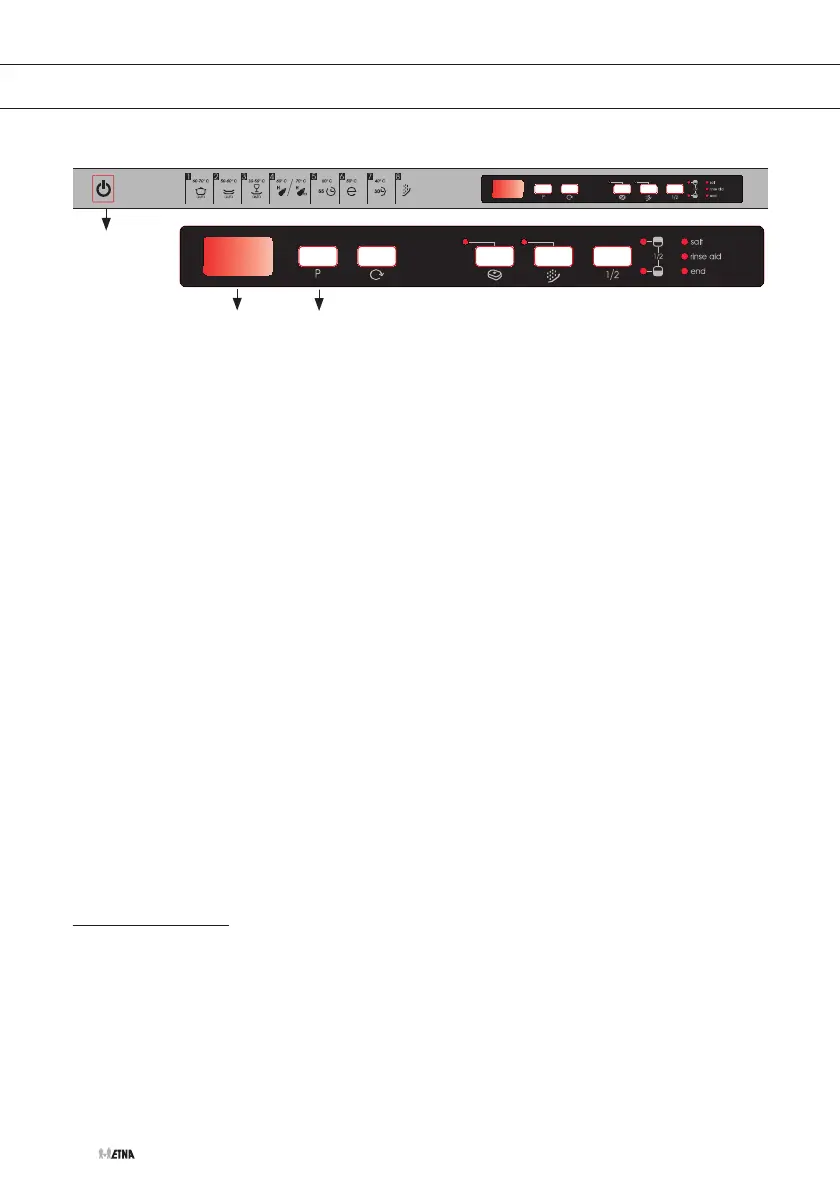
Press and hold the programming button (3) for more than 3 seconds.
The ‘End program’ indicator is blinking. ‘1’ appears on the display.
Close the door of the dishwasher.
The machine pumps out for about 30 seconds. Following the end of
this, an alarm signal will sound 5 times and the indicator shows that the
program has finished.
Switch off the dishwasher with the on/off button (1).
Press the program button (3) and keep it pressed.
Switch on the dishwasher simultaneously with the on/off button (1).
Keep the program button pressed until ‘SL’ disappears from the display.
The last water hardness setting appears on the display.
Set the desired water hardness level by repeatedly pressing the
program button (3).
Press the on/off button (1) after selecting the desired setting.
The set value is stored in the memory.
Rinse agent reservoir
Rinse agent is added during the final rinse. Rinse agent prevents traces of
water droplets being left behind on the clean dishes. Moreover, it ensures
that the dishes dry quicker, since the water drains off more easily.
2
1
3


 To Next Page