EN 6
USING YOUR DISHWASHER
Control panel
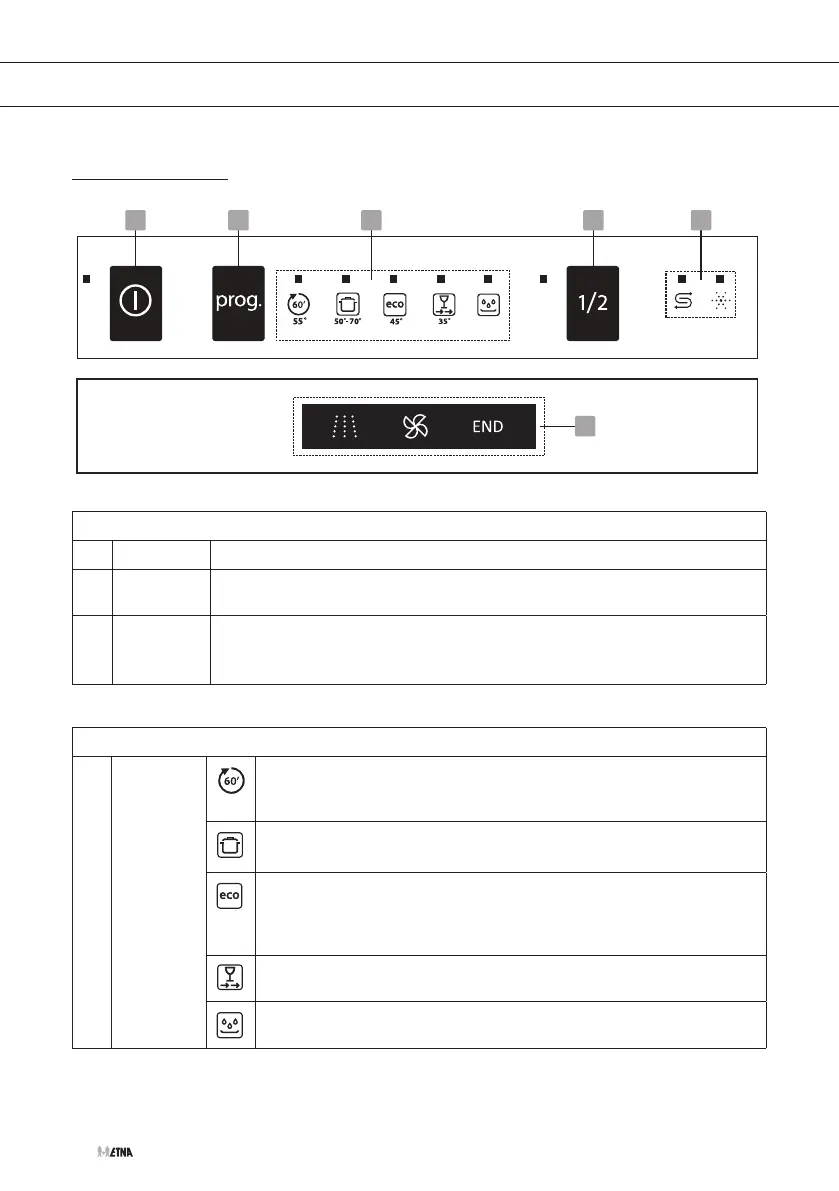
1 2 4 53
6
Operation (push buttons)
1 On/Off
Press this button to turn on your dishwasher, the screen lights up.
2 Program
Select the appropriate washing program. The corresponding indicator will
be lit.
3 Half-load
If you do not have too much load, you might consider using the half-load
program. This function saves water and energy. It can be used with the
programs Intensive and ECO.
Indicators
4 Program
indicator
1Hour
For normally soiled loads, such as pots, plates, glasses and lightly
soiled pans.
Intensive
Heavily soiled items include pots and pans. With dried on food.
ECO
This is standard program, it is suitable to clean normally soiled
tableware and it is the most efficient program in terms of its
combined energy and water consumption for that type of tableware.
Rapid
A shorter wash for lightly soiled loads that do not need drying.
Soak
To rinse dishes that you plan to wash later that day.


 To Next Page