4 5
2 TABLE OF CONTENTS
E
1 MANUAL
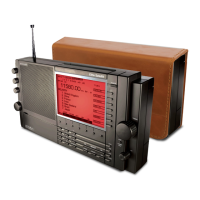
THANK YOU FOR PURCHASING THE etón E1 RECEIVER. THIS RECEIVER HAS BEEN DESIGNED AND MANUFACTURED TO HIGH QUAL-
I
TY STANDARDS, AND WILL PROVIDE RELIABLE OPERATION FOR MANY YEARS. PLEASE CAREFULLY READ THE OWNER’S MANUAL IN
O
RDER TO TAKE ADVANTAGE OF THE MANY INTERESTING FEATURES THAT WILL PROVIDE ENJOYABLE LISTENING TO RADIO BROAD-
C
ASTS AROUND THE WORLD.
IMPORTANT SAFEGUARDS continued
items placed upon or against them, paying particular atten-
t
ion to cords at plugs, convenience receptacles, and the
point where they exit from the product.
1
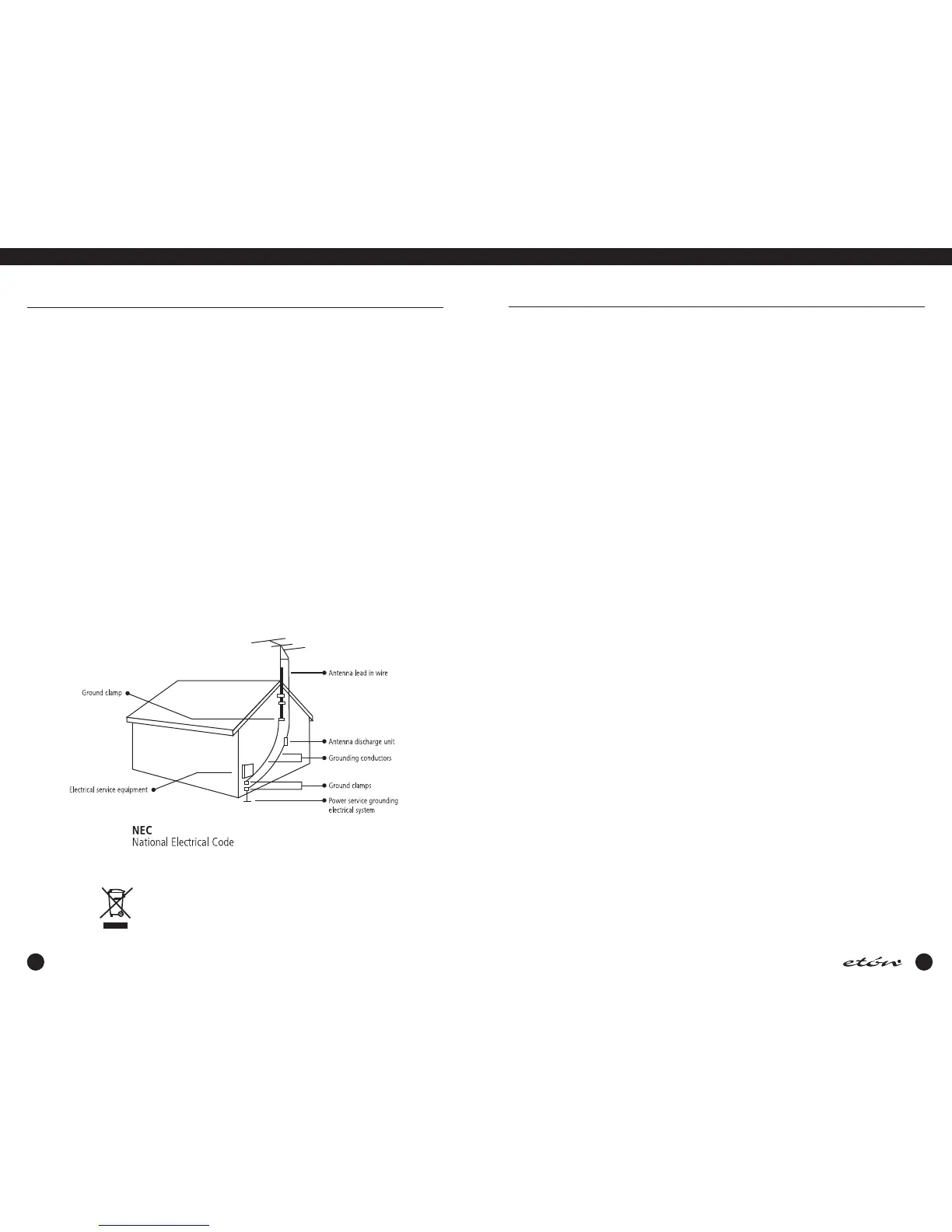
4. Outdoor Antenna Grounding - If an outside antenna or
cable system is connected to the product, be sure the anten-
na or cable system is grounded so as to provide some pro-
tection against voltage surges and built-up static charges.
Article 810 of the National Electrical Code, ANSI/NFPA 70,
p
rovides information with regard to proper grounding of the
m ast and supporting structure, grounding of the leadin wire
t
o an antenna discharge unit, size of grounding conductors,
location of antenna-discharge unit, connection to grounding
e
lectrodes, and requirements for the grounding electrode.
See figure A .
1
5. Lightning - For added protection for this product during a
lightning storm, or when it is left unattended and unused for
l
ong periods of time, unplug the AC adapter from the wall
outlet and disconnect the antenna or cable system. This will
prevent damage to the product due to lightning and power-
line surges.
16. Power Lines - An outside antenna system should not be
located in the vicinity of overhead power lines, other electric
light or power circuits, where it can fall into such power
lines or circuits. W hen installing an outside antenna system,
extreme care should be taken to keep from touching such
power lines or circuits as contact with them m ay be fatal.
17. Overloading - Do not overload wall outlets and extension
cords or integral convenience receptacles as this can result
in a risk of fire or electric shock.
18. Object and Liquid Entry - Never push objects of any kind
into this product through openings as they may touch dan-
gerous voltage points or short-out parts that could result in
fire or electric shock. Never spill liquid of any kind on the
product.
19. Servicing - Do not attempt to service this product yourself as
opening or removing covers may expose you to dangerous
voltage or other hazards. Refer all servicing to qualified ser-
v
ice personnel.
20. Damage Requiring Service - Unplug this product from the
w
all outlet and refer servicing to qualified service personnel
under the following conditions:
a. When the AC adapter cord or plug is damaged.
b. If liquid has been spilled, or objects have fallen into the
product.
c
. If the AC adapter has been exposed to rain or water.
d. It the product does not operate normally by following the
o
perating instructions. Adjust only those controls that are
covered by the operating instructions. An improper adjust-
m
ent may result in damage and will often require extensive
work by a qualified technician to res tore the product to its
n
ormal operation.
e. If the product has been dropped or the cabinet has been
d
amaged in any way and
f. When the product exhibits a distinct change in perfor-
mance- this indicates a need for service.
21. Replacement Parts - W hen replacement parts are required,
be sure the service technician has used replacement parts
specified by the manufacturer or have the same characteris-
tics as the original parts. Unauthorized substitutes may
result in fire, electric shock or other hazards.
22. Safety Check - Upon completion of any service or repairs to
this product, ask the service technician to perform safety
checks to determine that the product is in proper operating
condition.
23. Wall or Ceiling Mounting - The product should be mounted
to a wall or ceiling only as recommended by the manufac-
turer.
24. Heat - The product should be situated away from heat
sources such as radiators, heat registers, stoves, or other
products (including amplifiers) that product heat.
ENVIRONMENT
Disposal
According to the European Directive 2002/96/EC all electrical and
electronic products must be collected separately by a local collection
system. Please act according to your local rules and do not dispose
of your old products with your normal household waste.
IMPORTANT SAFEGUARDS p.3
TABLE OF CONTENTS p.5
GENERAL DESCRIPTION p.7
POWER SUPPLY p.7
• AC ADAPTER and EXTERNAL DC POWERING
• BATTERY INSTALLATION
• BATTERY OPERATION
• BATTERY CONDITION
INSTALLATION p.9
• UNPACKING
• LOCATION
• FIXED INSTALLATION
• PORTABLE OPERATION
• ANTENNA REQUIREMENTS
• VIEWING ANGLE
• INSTALLATION DIAGRAM
E1 FRONT PANEL DESCRIPTION p.12
TOP PANEL DESCRIPTION p.16
E1 DISPLAY DESCRIPTION p.17
SIDE PANEL DESCRIPTION p.19
GETTING STARTED p.20
• GENERAL OPERATING INFORMATION
• FIRST STEPS
• DIRECT FREQUENCY ENTRY
• SHORTWAVE ‘METER' BAND DESIGNATOR ENTRY
• FREQUENCY RESOLUTION
• FRONT PANEL LOCK (UNLOCK)
• AM SYNCHRONOUS OPERATION
• SSB OPERATION
• PASSBAND TUNING
• FM OPERATION
• AGC OPERATION
• BEEP TONES
MEMORY FUNCTIONS p.25
• MEMORY DESCRIPTION
• THE MEMORY DISPLAY
• STORING A MEMORY CHANNEL
• RECALLING A MEMORY CHANNEL
• DELETING A MEMORY CHANNEL
COUNTRY FUNCTIONS p.27
•
COUNTRY DESCRIPTION
• THE COUNTRY DISPLAY
• STORING A COUNTRY CHANNEL
• RECALLING A COUNTRY CHANNEL
•
DELETING A COUNTRY CHANNEL
• CHANGING OR ADDING COUNTRY NAMES
E1 MENUS p.30
• MAIN MENU
• RADIO SETTINGS
• AUDIO SETTINGS
• SET CLOCKS
• CLOCK MODES
• TIMERS
• TIMER 1 ENABLE / DISABLE
• TIMER 2 ENABLE / DISABLE
• LOCAL / GMT TIME SELECT
SEEK FUNCTION p.39
• DESCRIPTION
• VFO MODE
• MEMORY & COUNTRY MODE
T.SCAN FUNCTION p.40
• DESCRIPTION
• MARKING CHANNELS FOR T.SCAN
• UNMARKING T.SCAN CHANNELS
• SELECTING THE SCAN STOP METHOD
• INITIATING AND STOPPING THE T.SCAN
CLOCK AND TIMER FUNCTIONS p.41
• TIME DISPLAY
• SETTING 24 HOUR CLOCKS AUTOMATICALLY
• SETTING THE 24 HOUR CLOCKS MANUALLY
• TIMER OPERATION
• SETTING TIMER ON/OFF TIMES
• SETTING A W AKE OR SLEEP TIMER
• SETTING TIMER MEMORY CHANNELS
• ENABLING/DISABLING TIMER OPERATION
SPECIAL USE FEATURES AND FUNCTIONS p.45
• LOCK ALL ENTRY TO KEYPAD
• BROADCAST BAND TUNING STEP SIZE
• DELETE ALL MEMORY OR COUNTRY CHANNELS
• DELETE ALL MEMORY AND COUNTRY CHANNELS
• DISPLAY LIGHTING


 To Next Page