4G FWP ETS-6688 User Manual
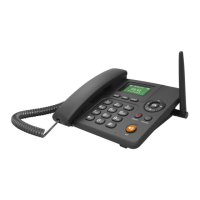
3 Key board Introduction
1) 【Menu】:In idle state, press this button to select item or go to sub-menu.
2) 【WIFI】:In idle state, press this button to go to WIFI sub-menu
3) 【BOOK/BACK】:In idle state, press this button to go to phone book, press ”BACK” to
return to upper Menu
4) 【 】:In the idle state, set the menu
【 】:In the idle state, go to the calculation menu
【▲】:In the idle state,go to the calendar Settings
【▼】:In idle state,go to Shortcut key setting
5) 【OK】:confirm your setting
6) 【ON/OFF】:press this button about 3 seconds for power on phone. Press 3 seconds
again, the phone will be power off.
7) 【Talk】:Outgoing with the dialed phone number immediately. In idle state, pressing this
button will be into “Outgoing Call log”.
8) 【Redial】:Redial the last phone call number.
9) 【H.F.】:Press this button instead of taking up handset.
10) The Number key 1,2,3,4,5,6,7,8,9,0 and *, #
4. Installation
4.1 SIM card installation
Open the battery cover and take away battery, then the SIM slot can be seen. Please insert SIM
card into the SIM slot.
4.2 How to use the phone
4.2.1 Turn On phone
After installing SIM card and battery,press power ON/OFF button 3 seconds, the phone will


 To Next Page