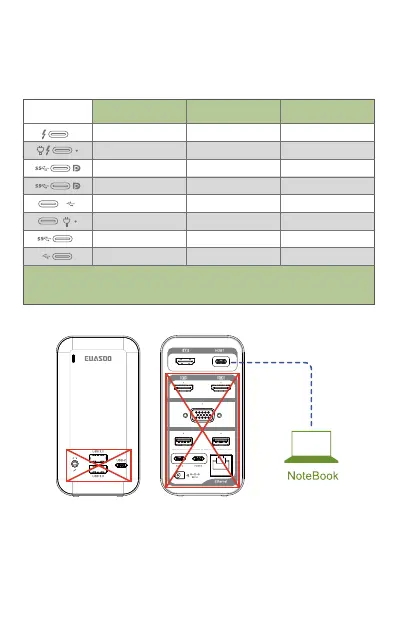
When connect your laptop with HOST 1, only HDMI 1 works.
When connect your laptop with HOST 2, you need connect the
provided power adapter to DC port, expect the HDMI 1 port, other
ports work. You need to connect your laptop power adapter to
POWER port when you want to charge your laptop through our
docking station, it can use the docking normally without
connecting to this port when you needn't charge your laptop.
VGA
1
USB 3.0 USB 3.0
HOST 1
. 03 .
Remarks: “?”means it needs to see the computer manual or consult the
computer manufacturer's customer service what functions does the port support.
*Information above is only for reference.
DisplayPort
(HDMI/VGA ports)
Data transfer
(USB ports)
USB-C power supply
(POWER port)
10
10
√
√
√
√
?
×
×
×
√
√
√
√
√
×
√
√
?
√
×
×
×
√
×
×
confirm. Some port flags listed below can be used as reference, if
you encounter other port flags not included below, you can check
this by looking up your computer's specification online, or by
contacting your computer manufacturer's customer support. It
also is incompatible with the USB-A to USB-C Adapter.


 To Next Page
 Loading...