Hot key for multi-display: Windows+P
Multiple display:
connect up to 2 host systems and 4 monitors
VGA
1
USB 3.0 USB 3.0
VGA
1
USB 3.0 USB 3.0
HOST 1
HOST 2
DC 12V3A
PD3.0
HDMI 1
HDMI 2
HDMI 3
VGA
C
B
B
B
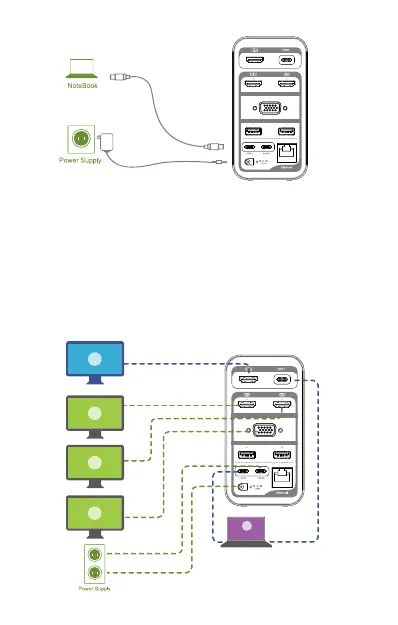
1. When you have only one Thunderbolt 3 host (Support Triple
Display)
For macOS host with 2 type c ports, connect up to 4 monitors:
HDMI1 + HDMI2 + HDMI3 + VGA. It only supports Triple Display
for macOS: HDMI1 + (HDMI2 + HDMI3 + VGA) + HOST , and
(HDMI2 + HDMI3 + VGA) only have the same display. To prevent
insufficient power supply of the laptop, it is recommended that the
macOS connect the laptop charging cable to the POWER port when
using the external monitors.
A
Mac OS
. 05 .
Only use USB-C to
USB-C cable provided.
Connection to the host is
only supported with the
rear HOST 2 port


 To Next Page
 Loading...