8 Eureka Customer Service HELPLINE 1-800-282-2886
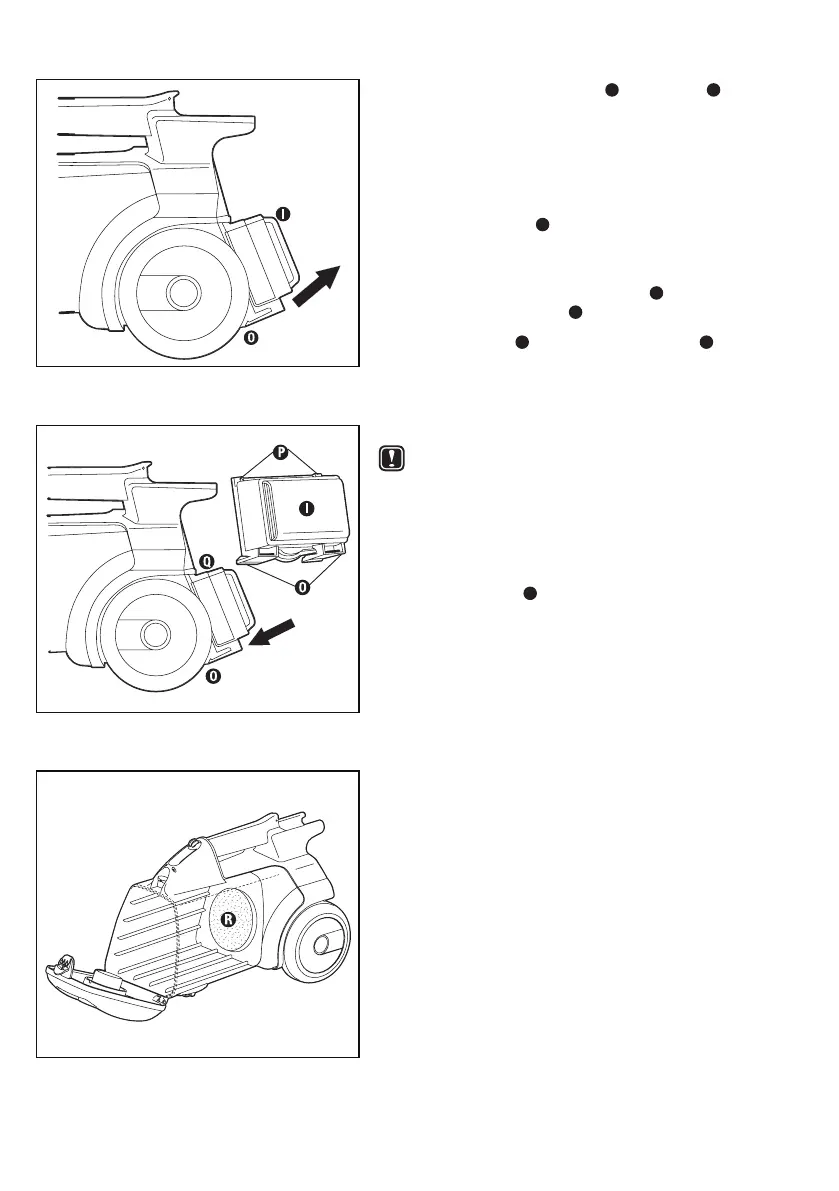
To Replace HEPA Filter (on some models)
Step 1: Grasp the bottom clips
O
on the lter
I
(Fig. 13).
Step 2: Pull out and down to release (Fig. 13).
To Re-install HEPA Filter
(on some models)
Check the HEPA lter
I
with each disposable dust bag
change. Replace twice a year or after every six bag
changes as needed.
Step 1: Insert upper lter corner tabs
P
rmly under
rear housing tabs
Q
(Fig. 14).
Step 2: Pivot lter
I
down until bottom clips
O
on
lter click securely into place on the cleaner
(Fig. 14).
To Clean the Motor Filter
CAUTION: Turn off vacuum and unplug the
electrical cord before cleaning
the motor lter. Never operate the
vacuum cleaner without the motor
lter in place.
Step 1: Remove the dust bag. See page 7 for details.
Step 2: Grasp lter
R
and pull out to remove (Fig. 15).
Step 3:
Rinse under warm water.
Step 4: When all parts are completely dry, replace
lter and disposable dust bag (see page 7
for more details).
Fig. 13
Fig. 14
Fig. 15


 To Next Page
 Loading...