45
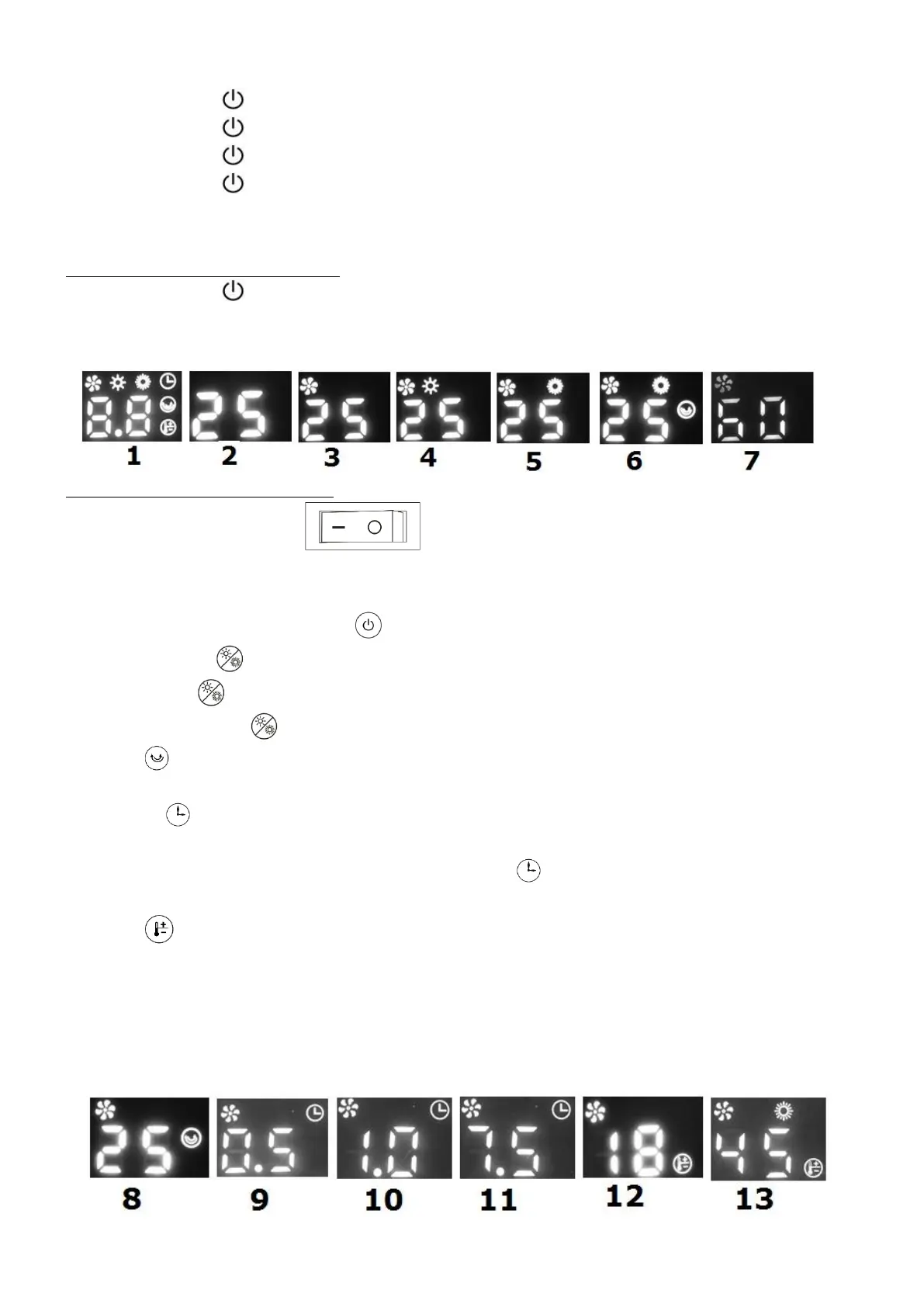
2. Pressing x1 on turns on the heater fan, see figure 3.
3. Pressing x2 on turns on the heater at low power, see figure 4.
4. Pressing x3 on turns on the heater at high power, see figure 5.
5. Pressing x4 on turns on the heater at high power and the oscillator (swivel) function,
see figure 6.
Switching off manual operation
6. Pressing x5 on turns the heater back on to standby, and makes it continue to cool
for 60 seconds while the display counts down the seconds and the fan indicator light
stays on, see figure 7.
Operating with remote control
1. Press the on/off button to '-'=on. The display shows the ambient
temperature and all function images briefly, see figures 1 and 2. The heater is now in
standby.
2. Switch the heater on with the button. The heater fan will start to blow.
3. Press once to turn on the heater at low power.
Press twice to turn on the heater at high power.
Press three times to turn on the heater fan. See figures 3, 4 and 5.
4. Press to oscillate (swivel) the heater, see figure 8, press again and the oscillator
(swivel) stops.
5. Use the timer button to set the time, after which the device switches itself off. Each
time you press this button, the set time will increase by half an hour (0.5 hours to 7.5
hours). The timer symbol appears on the screen . The time can be set from 1 to 7.5
hours, see figures 9, 10 and 11.
6. Press (temperature setting button) to set the desired temperature. Please note
that this button only works when the heater is in heating mode, not in ventilation
mode! The thermostat symbol appears on the screen and the numbers on the screen
start flashing. The desired temperature can be set with the + and - button. The set
temperature flashes 5x, then the display displays the ambient temperature again. See
figures 12 and 13.



 To Next Page