User Manual EVAstream with DMX controller V21.1
9
5. Operating the DMX controller
Step 1: Swim Test
Before you start the training program, you first do a Swim Test. This is how you determine your
current speed level. Experienced swimmers, for instance, can start with “Swim Test 80%”, and less
experienced swimmers with “Swim Test 50%”. The Swim Test that you can just manage to endure
determines your speed level. It may be necessary to do the Swim Test at different levels to
determine your optimum speed level. This is only done once, so take your time and make sure you
find the correct level. It is an important step prior to starting with the real workouts.
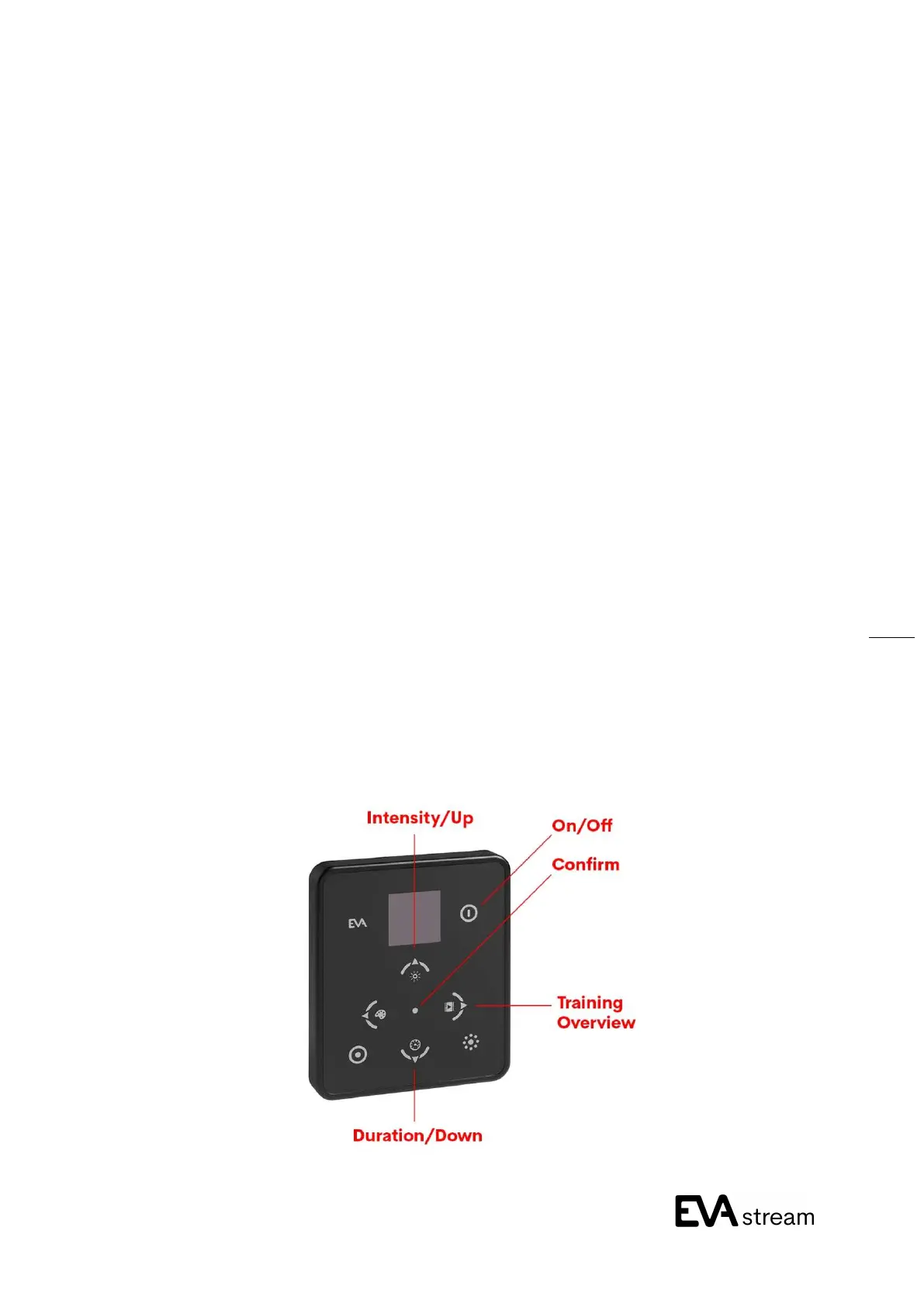
1. Switch on the DMX controller by pressing the “On / Off” button. The button lights up green.
2. Press the “Training Overview” button. On the screen you will see an overview of the available
workouts. Use the “Up” and “Down” buttons to select the Swim Test that you think fits your level.
3. Press the “Confirm” button.
4. The underwater lighting turns on. You now have 1 minute to get into the water, and get ready for
the test.
5. After completing the test, you may need to run the test again at a higher or lower level. Then
perform steps 2-4 again.


 To Next Page