Temperature setting range:-30Cº to 40Cº
The LED Display range:-40Cº to 45Cº
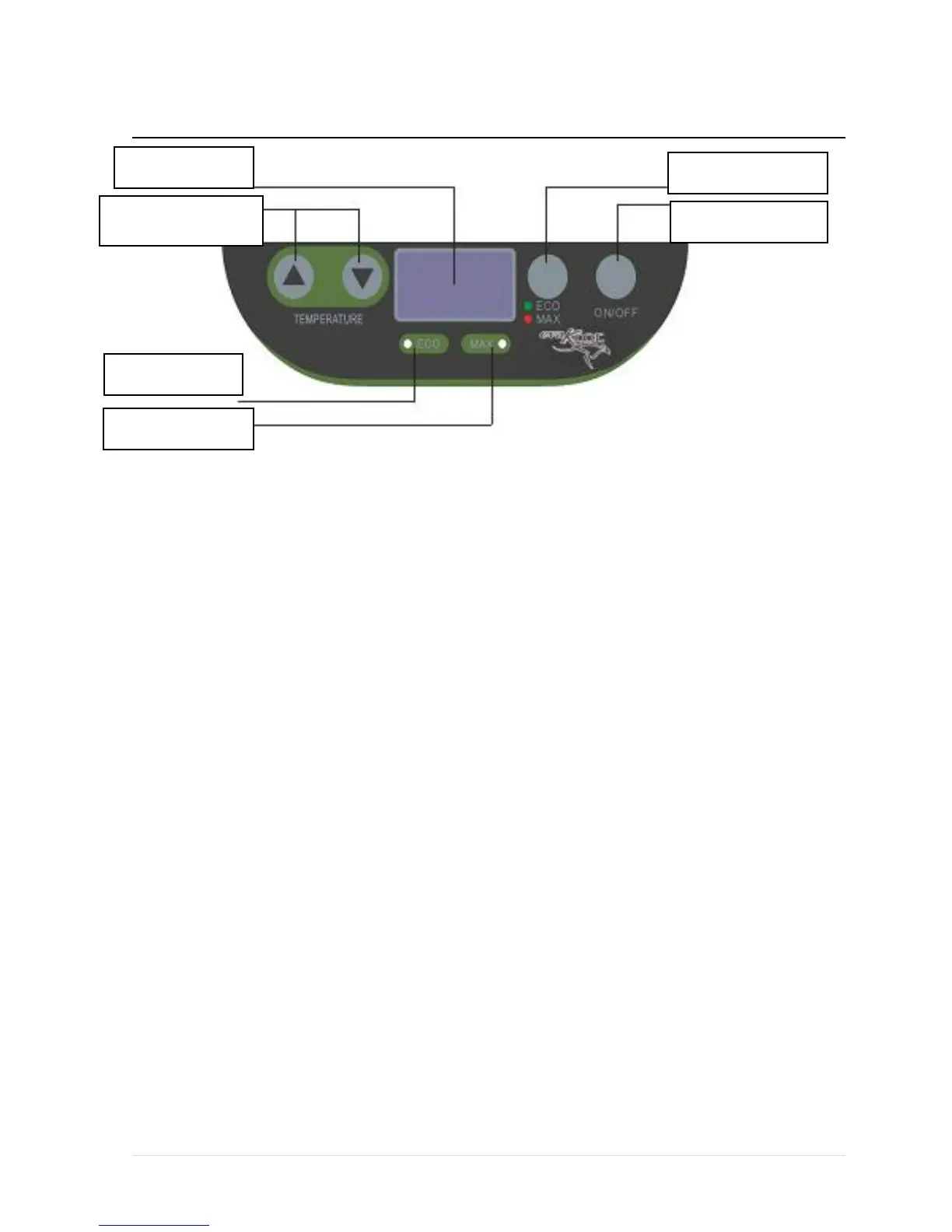
o Press the button △UP or ▽DOWN button to adjust the temperature the unit aims to
achieve. Press the button △ to increase or the button▽to decrease the temperature.
o When you press the △UP and ▽DOWN buttons at the same time, it switches the
display between Cº and °F.
o Press the button “ECO” to enter the economy running mode, the ECO indicator green
LED light will be on. Press the button again; the unit will enter the maximum
running mode, the MAX indicator red LED light will be on.
o The economy mode runs the compressor at a lower speed to save power; the maximum
mode runs the compressor at a higher speed increasing power usage. Maximum
mode is useful if the ambient temperature is over 30 Cº or fast cooling is required.
o Plug in the DC or AC power. Press the button ON/OFF to turn the unit on. The LED
display on the control panel will turn on and the interior temperature is displayed.
o If the power supply is cut off or disconnected, the unit will switch off automatically and
once the power supply is restored it will automatically switch back on.
4. Cleaning and maintenance
o Clean the appliance inside and out with a clean damp cloth every week. If it is dirty, use


 To Next Page