Need help?
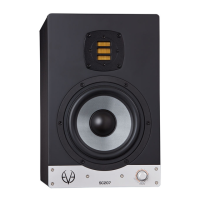
Do you have a question about the Eve Audio SC207 and is the answer not in the manual?
Check package components, voltage setting, and DIP Switches.
Connect monitor inputs (XLR/RCA) to audio source line output.
Engage power switch; LEDs indicate status; press volume to exit standby.
Check package, voltage, DIP switches, and connections.
Metal grid protects tweeter via magnetic attraction; handle carefully.
Describes different LED ring indicators for volume and settings.
Turn monitor on/off; press control for standby; press again to exit standby.
Adjust volume; LED ring indicates level; mute function.
Access menu to set filters and LED behavior; select, adjust, and confirm settings.
Filters adjust frequency response to room acoustics; use sparingly.
Boost/attenuate frequencies below 300 Hz to correct room issues.
Boost/attenuate frequencies above 3 kHz based on listening distance.
Describes effects of combining low and high filters on mid-frequencies.
EQ filter at 170/160 Hz for low-mids or 80 Hz for punch.
Select LED ring display mode (bright/dim, ring/point) for volume indication.
Settings are automatically saved; disconnection does not lose them.
Disconnects monitor from power grid; saves settings; reduces consumption to 0W.
Secure volume and filter settings or allow modification.
Adjusts operating voltage for local power grid; requires fuse change.
Connects monitor to power grid via IEC connector; includes fuse for troubleshooting.
Place monitors vertically, use rubber feet for stability and decoupling.
Position tweeters at ear height; set optimal listening distance for SC207/SC208.
Form equilateral triangle with monitors and listening position for optimal stereo imaging.
Subwoofer integrates with stereo pair; set crossover and position for optimal integration.
Position five speakers and subwoofer around listening position for surround sound.
Address reflections from hard surfaces near desk/mixer to improve sound.
Discusses room acoustics importance and provides bibliography for further study.
 General
| Type | Active Studio Monitor |
|---|---|
| Tweeter | AMT RS2 |
| Input Types | XLR, RCA |
| Amplifier Power (Woofer) | 100 W |
| Crossover Frequency | 2.8 kHz |
| Max. SPL @ 1 m | 101 dB |
| Woofer Size | 7 inch |
| Input Impedance | 10 kΩ |
| Dimensions (WxHxD) | 220 x 365 x 280 mm |

 To Next Page