Alternate Voicings
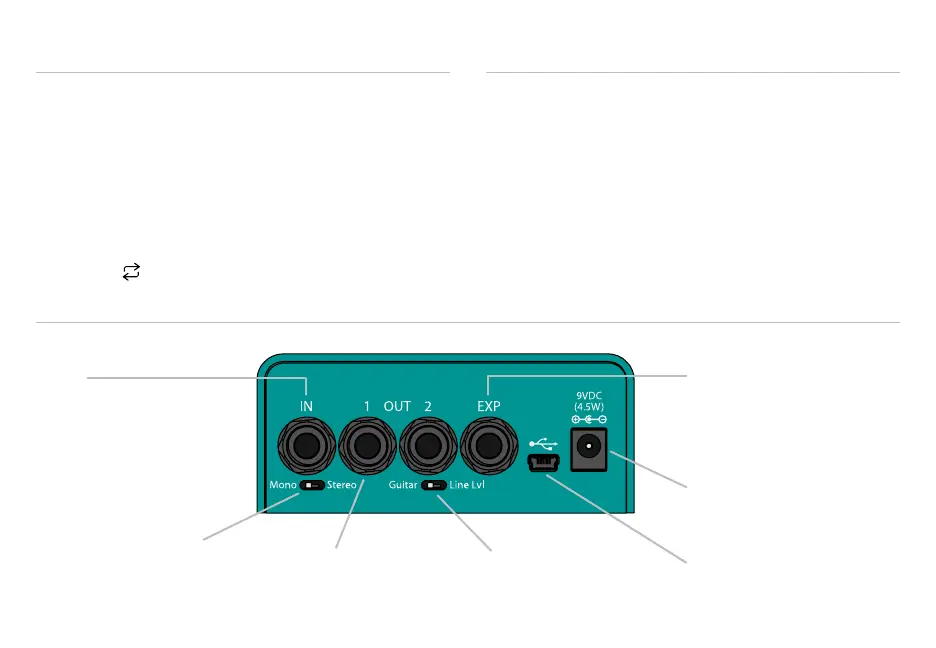
EXP
Connect Expression Pedal,
Aux Switches or TRS MIDI
(See System Setup)
Outputs 1 & 2
In Mono, both outputs
have the same dry signal
Input
Standard TS (Mono)
or TRS (Stereo)
Power
9VDC center-negative
Mini USB
Software updates and
MIDI over USB
Mono/Stereo Switch
Left = Mono (TS plug)
Right = Stereo (TRS plug)
In Stereo: Tip is OUT1, Ring is OUT2
I/O Level Switch
Left = Guitar (instrument)
Right = Line/Eects Loop
The perfect pairing of tones to surf the slow vibey
waves or drive to pulsing depths.
Drive: a balanced distortion with superb dynamics and
touch sensitivity.
Vibe: a faithful emulation of the classic Uni-Vibe™
by Shin-ei — in stereo!
Press Swap
LED Button to change the eect order.
Both Drive and Vibe have an alternate voicing that can
be toggled by pressing the LED Buttons above their
corresponding footswitch. The color of the LED Button
indicates the chosen voicing.
Green Drive is a dynamic, mid range crunch.
Red Drive is a smooth and boosted overdrive.
Green Vibe is the traditional Uni-Vibe.
Red Vibe is a deeper, phasey Vibe.
Two Eects in One



 To Next Page