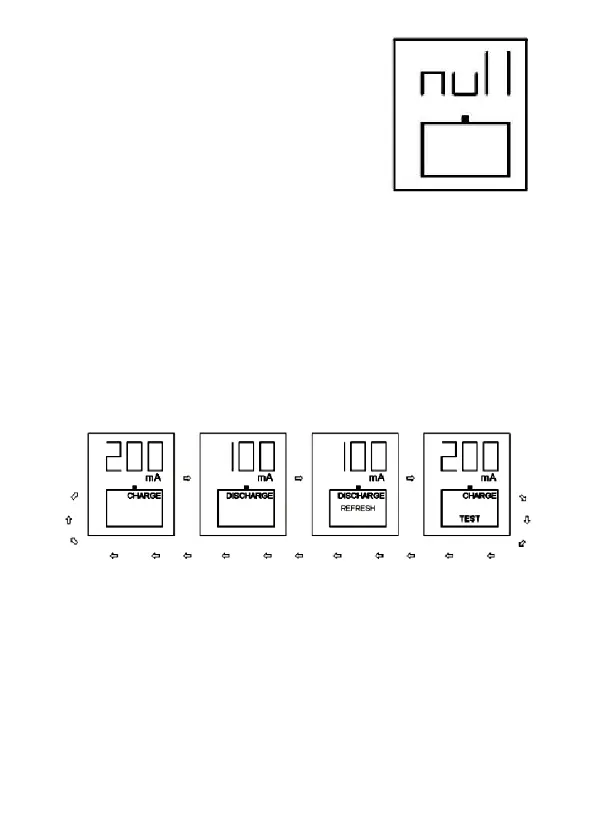
Defective or completely empty (“0”
voltage) batteries may be
unrecognized by NC-1000 charger,
then “null” icons will be shown and
no further operation will be
possible*.
*Sometimes the most basic, simple charger
with small, 50-150mA charging current is able to revive such completely
discharged cells. If successful they can be charged with NC-1000
afterwards.
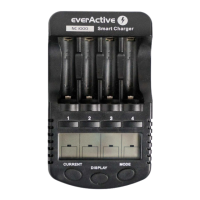
Mode selection.
Pressing and holding “Mode” button for about 1 second
activates mode change for all charging slots. Then short
pressing of “Mode” button will cycle between available
operating modes: “Charge”, “Discharge”, “Refresh”, “Test”.
For 4 seconds after selecting the desired operation mode
the user can adjust charging/discharging current by
pressing the “Current” button.
Additional mode/current changes can be applied to
individual cells by selecting each charging slot (pressing
“1,2,3,4” buttons) before using “Mode/Current” buttons.


 To Next Page