05
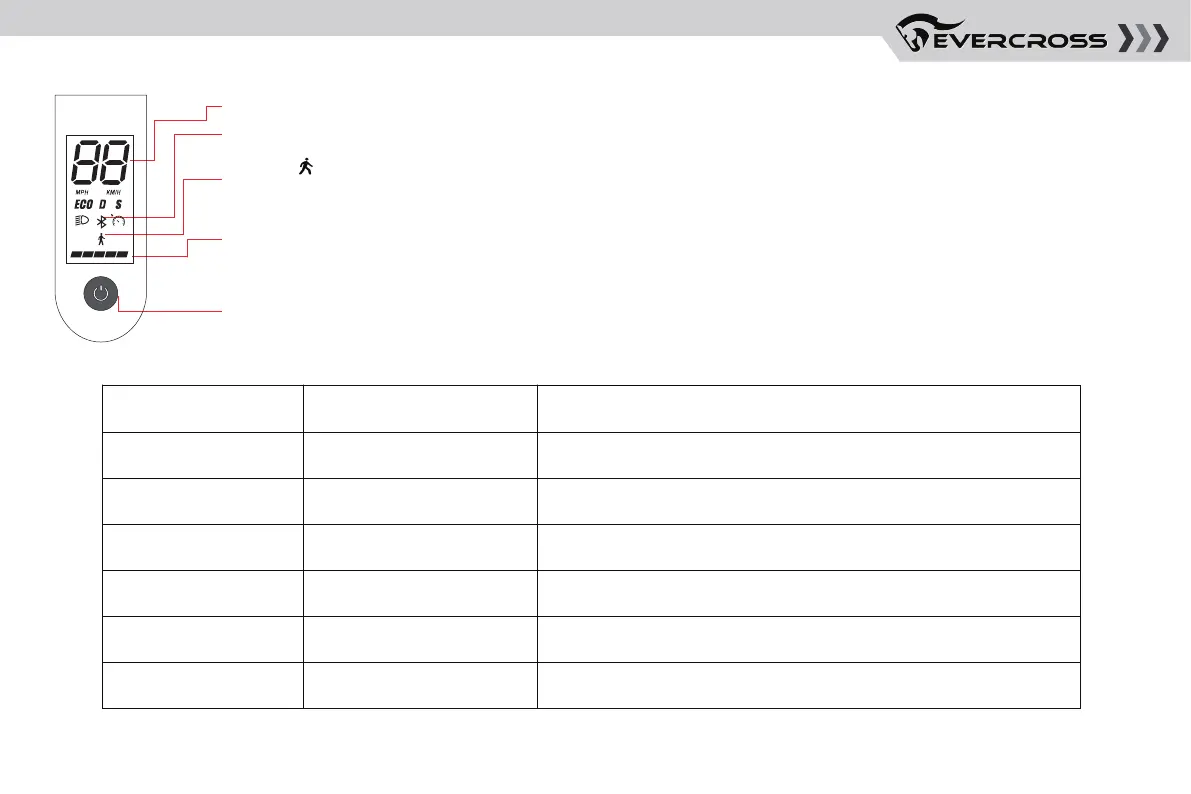
2. Dashboard & Power Switch
You can turn on/off the function and switch gears by adjusting the number of times of pressing the power button,
and the setting is complete when you hear a beep!
3. Parameter Adjustment Table
Press Default Mode Function
Single press Switch between standard gear and pedestrian mode (cycle)/
/Press twice Turn on/off the headlights
Press three times Switch between MPH/KMHMPH
Turn off
Zero start
25 KM/H
Press four times Turn on/off cruise control
Zero start/No-zero start
25/30 KM/H
Press five times
Press six times
Speedometer: Display the current speed of the scooter, as well as to display error codes.
Battery Level: The battery power is indicated by bars,
each representing approximately 20% of a full battery.
Power Button: Press the button to turn the scooter on, and hold the button for 3 seconds to turn the
scooter off. When the scooter is on, press the button to turn the headlight on/off, and double press to
switch between modes.
Bluetooth: The icon indicates that the scooter has been successfully connected to the mobile device.
Modes: for pedestrian mode (the maximum speed is 6 km/h, it is easier to push the scooter along
as you walk).


 To Next Page