Need help?
Do you have a question about the EVERCROSS EV5 and is the answer not in the manual?
Details on ensuring proper working order, battery charge, safety gear, and clothing.
Step-by-step instructions for safely stepping onto the hoverboard and finding balance.
Using center of gravity for direction control, acceleration, deceleration, and turning.
Steps for safely stepping off the hoverboard from a stopped position.
Specifies weight limits and the alert system for exceeding maximum speed.
Details how low temperatures affect lubrication, internal resistance, and battery capacity.
Provides cautions and general safety instructions for riding in cold weather.
Step-by-step guide for charging, including initial and recharge times.
Fixing common issues like shaking or steering problems by recalibrating the device.
Instructions to recalibrate the hoverboard's gyro boards for optimal performance and leveling.
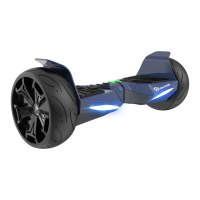
The EVERCROSS EV5 Self Balancing Scooter is a personal transporter designed for safe and enjoyable riding. It utilizes digital electronic gyroscopes and acceleration sensors to maintain balance and motion, responding to the user's center of gravity. The device incorporates a control system to drive the motors located within the wheels and features a built-in inertia dynamic stabilization system to assist with balance during forward and backward movement. To enhance stability, riders are advised to shift their weight, especially when navigating turns at higher speeds, to counteract centrifugal force.
The EV5 Hoverboard serves as a personal mobility device, allowing users to move by shifting their body weight. Its core function relies on an intuitive system that detects subtle movements, translating them into acceleration, deceleration, and turning. The device is equipped with foot mats that house sensors, which automatically initiate self-calibration when the user steps on them. These sensors are crucial for detecting the rider's presence and weight distribution, enabling the hoverboard to respond accordingly.
The hoverboard features a power button for turning the device on and off. Upon activation, a battery LED indicator illuminates, signaling that the device is powered. The display board, located in the middle of the hoverboard, provides visual cues regarding the battery status: a green LED indicates a charge above 20%, while a red LED signifies that the power is at 10% or lower, prompting the user to recharge. Additionally, a status indicator LED lights up when the foot mats are triggered, indicating that the EV5 is ready for use. In the event of a system error during operation, this LED will turn red, accompanied by an alarm sound, to alert the user to take precautions.
A notable feature of the EV5 Hoverboard is its built-in Bluetooth speaker, allowing users to play music wirelessly while riding. The pairing process involves turning on the EV5, which then announces its readiness for a Bluetooth connection, entering pairing mode. Users can connect their smartphone or music device via Bluetooth, and once paired, music can be streamed directly through the hoverboard's speakers. Volume and track controls are managed through the connected music device.
The EV5 is also an App-enabled hoverboard, compatible with most mobile devices. Users can download the "EVERCROSS" app from the App Store or Google Play Store, or by scanning a QR code. This app allows for changing certain features of the hoverboard, enhancing the user experience with additional functionalities. For the app to connect, the hoverboard must be powered on, and the smartphone's Bluetooth enabled, with a PIN "000000" used for pairing.
Before riding, it is imperative to thoroughly read the user manual to understand all elements and safety precautions. Practicing at slower speeds in a flat, open area is recommended before using the device in public. The pre-ride checklist emphasizes ensuring the hoverboard is in proper working order, with a fully charged battery and firmly locked screws on the tires. Appropriate safety gear, including a properly fitted helmet, comfortable clothes, and flat closed-toe shoes, should always be worn.
To operate the device, users should stand directly behind it and place one foot on a foot mat, keeping weight on the foot still on the ground to prevent unintended movement. Once ready, the second foot should be placed quickly and evenly on the other foot mat. Maintaining a relaxed posture and focusing on the desired direction helps in finding the center of gravity and controlling movement. The hoverboard is intuitive, responding to subtle shifts in weight to move, accelerate, decelerate, and stop. To turn, riders should focus in the desired direction and remain relaxed. Bending knees is advised for navigating bumps or uneven roads to absorb shock and maintain balance.
Dismounting is achieved by lifting one leg completely off the foot mat and placing it back on the ground, then stepping off with the other foot. This "stepping back" method is crucial to avoid sending the EV5 into a tailspin. If the hoverboard is not placed on a level surface, an alarm will sound, and the warning indicator will light up, preventing movement until it is repositioned correctly.
The EV5 has weight and speed limitations for safety. Exceeding these limits can increase the risk of injury or product damage. When the maximum speed is reached, the device will beep and gently tilt the rider back to alert them. The operating range of the hoverboard can vary based on terrain (smoother, flatter surfaces yield greater distance), rider weight (lighter users have more range), ambient temperature (recommended temperatures increase range and battery life), and driving style (moderate, consistent speeds maximize distance, while frequent starts, stops, idling, and rapid acceleration/deceleration reduce it).
Safety alerts are triggered by system errors or improper operation, such as unsafe riding surfaces, tilted platforms, low battery voltage, charging status, excess speed, overheating, or blocked tires. When an alert occurs, the running indicator light turns red, and a beep sounds, prompting the user to cease operation. If the EV5 turns off during a safety alert, all systems halt, and the user must turn the hoverboard off and back on to unlock it from a safety lock.
Battery care is essential for the longevity and performance of the EV5 Hoverboard. The device comes with a built-in lithium-ion battery pack, which should be charged in a clean, dry location away from direct sunlight, flames, or sparks. The initial charge time is approximately 6 hours, with subsequent recharges taking 2-4 hours. Only the original charger should be used, and the charging port should be kept free of dust and debris.
It is recommended to charge the battery immediately after riding. Failure to periodically recharge the battery may lead to it not accepting a charge. The charger supplied with the EV5 should be regularly inspected for damage to the cord, plug, enclosure, and other parts; if damaged, the hoverboard should not be charged until repairs or replacements are made. The device has built-in overcharge protection, and it is normal for the charger to get warm during regular use.
Battery power level indicators provide clear information: a solid green light means the battery is 15-100% charged, while a flashing red light indicates 5-15% charge, recommending immediate recharging.
For long-term storage, if the EV5 is not used for an extended period, the battery should be recharged every 2 months to maintain its life. The lithium-ion battery is integrated into the device and should not be disassembled or removed. Users are cautioned against connecting the device or battery to improper power sources, placing them near fire or direct sunlight, or attempting to charge a damaged or leaking battery. Lithium-ion batteries are considered hazardous materials, and their recycling, handling, and disposal must comply with all local, state, and federal laws.
Many operational problems, such as shaking, beeping without movement, spinning, or drifting, can be resolved by recalibrating the hoverboard's gyro boards. This process ensures the hoverboard correctly perceives a flat surface and the rider's balance. To calibrate, the hoverboard must be placed on a flat surface with both upper LED indicators level. The power button should be pressed and held until the front LED lights flash fast 5 times, then blink with a longer interval. Releasing the button and restarting the hoverboard completes the calibration, leveling the device and correcting its directional awareness. This simple procedure can be performed anywhere.
 General
| Category | Electric Scooter |
|---|---|
| Motor Power | 350W |
| Battery Voltage | 36V |
| Tire Size | 8.5 inches |
| Suspension | Front and rear suspension |
| Foldable | Yes |
| Charging Time | 4-5 hours |
| Brakes | Disc brakes |
| Lighting | Front and rear LED lights, brake light |
| Display | LCD |
| Tire Type | Solid rubber tires |

 To Next Page