17
CHARGING YOUR HOVERBOARD
Your XP9 Hoverboard comes with a built-in lithium ion battery pack.
Be sure to charge the battery in a clean, dry location away from
direct sunlight, flames or sparks.
• Initial charge time: 6 hours.
• Recharge time: up to 2-4 hours.
• Please use only the original charger provided.
• Always charge the battery immediately after riding. Failure to recharge
battery periodically may result in a battery that will not accept a charge.
• The charger supplied with the XP9 should be regularly examined for
damage to the cord, plug, enclosure and other parts. In the event of such
damage, the Hoverboard must not be charged until it has been repaired
or replaced.
• It has built-in overcharge protection to prevent battery from being
overcharged.
Note: If the charger gets warm during regular use, this is a normal
response and is no cause for concern.
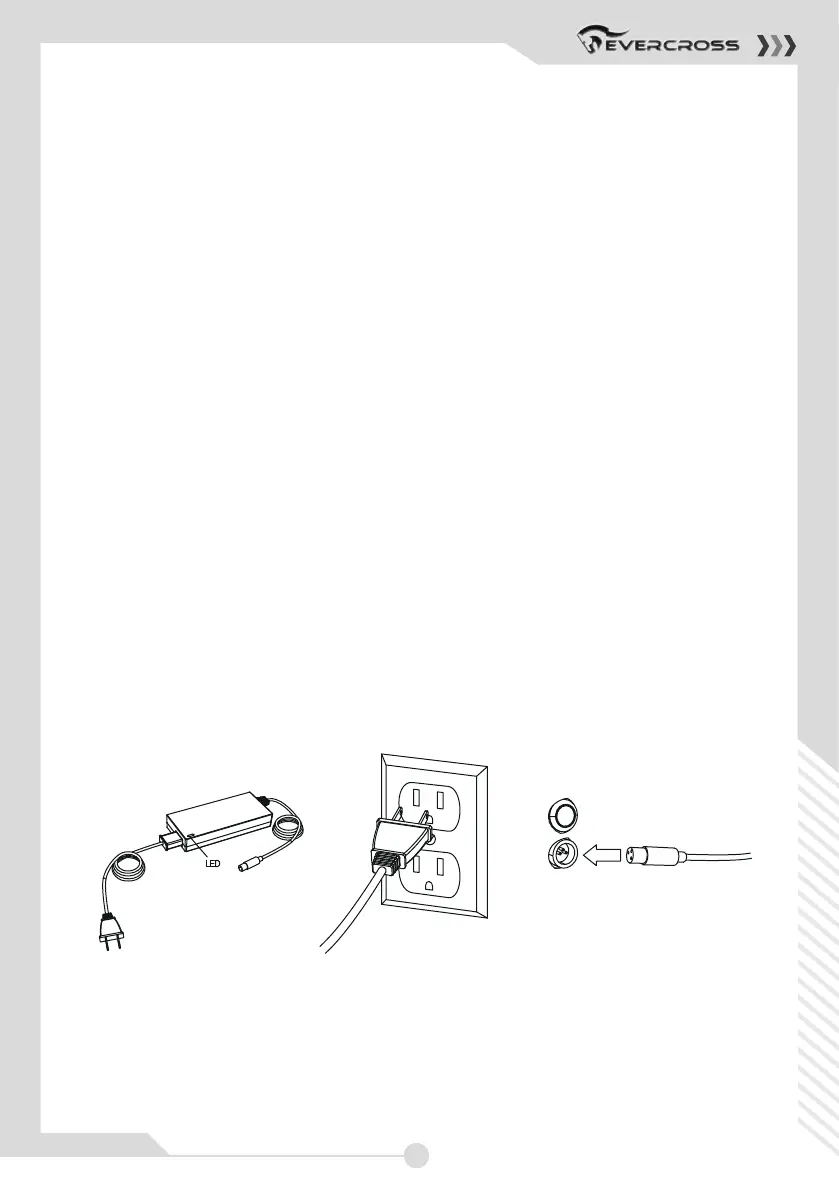
CHARGER
NOTE:
Wall outlet - Green (stand by)
Wall outlet and Hoverboard - Red
(charging)
Wall outlet and Hoverboard - Green
(charged)
1. Plug the charger plug into
wall outlet. The light on the
charger should be green.
Note: If green light (LED)
does not turn on, try a
different outlet.
2. Plug the charger into the charger
port on the XP9 Hoverboard. The
light on the charger should turn yellow
during charging. The light will turn
green again when charging is
complete.
(Note: Charger design may vary from one shown)



 To Next Page