EVERFOCUS ELECTRONICS CORPORATION
5
Connection to Controller
Two options are available for data output: Wiegand 26 and a special RS232 format.
Both formats are compatible with EverAccess controllers, and Wiegand 26 is
compatible with many brand name controllers. Table 2.2 describes these two data
formats and their corresponding connection method in detail.
Table 2.2 connecting controller and readers
Connection mode Controller end Reader end wires
DC IN Red
GND Black
Specialized RS-232 TX Blue
Specialized RS-232
Specialized RS-232 RX Gray
DC IN Red
GND Black
Data 0 Green
Wiegand 26
Data 1 Brown
Basic Mounting Instructions
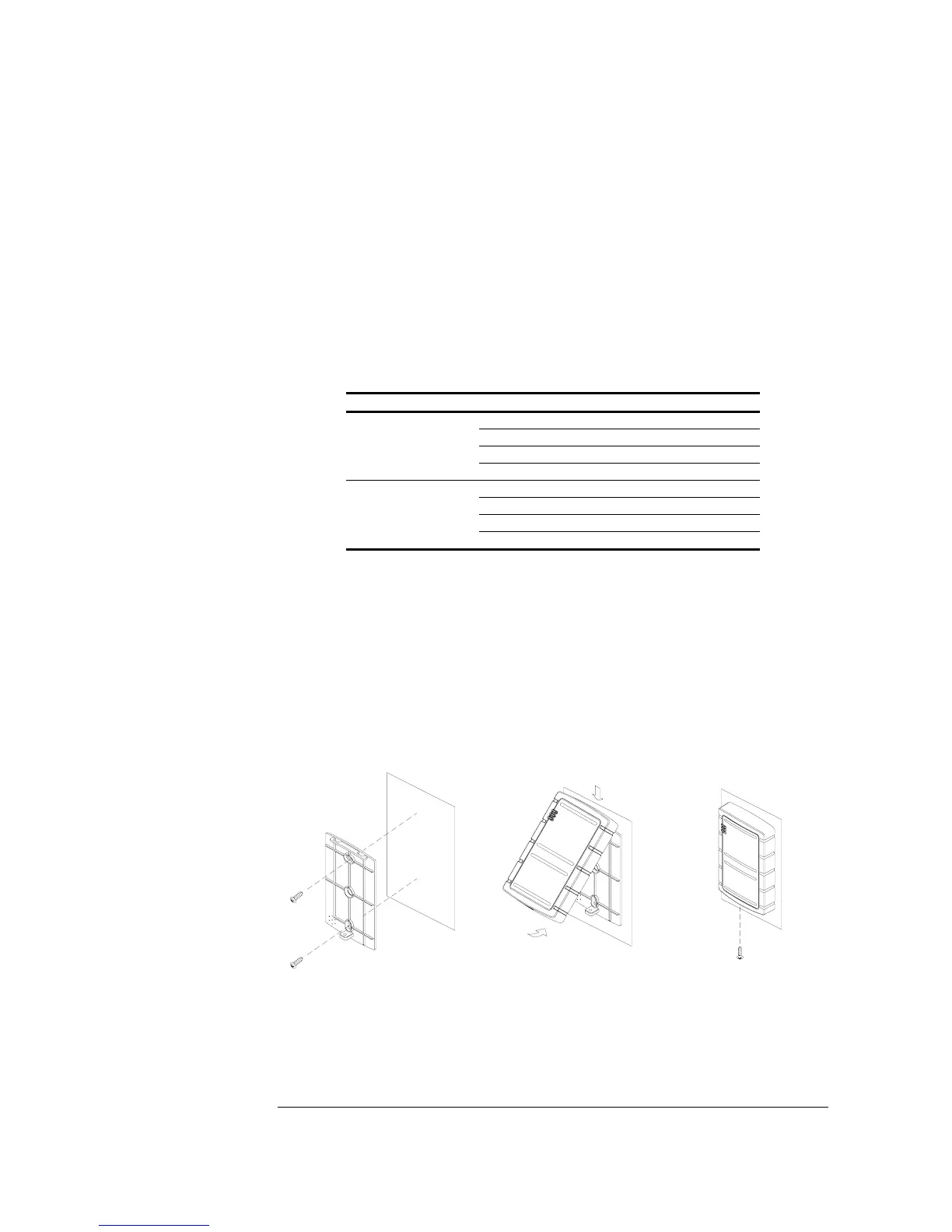
Please refer to Fig 2.1 to assist you with this portion of the installation. Fig. 2.1 (a), (b)
and (c) show the mounting steps for the regular reader, keypad reader and mullion
reader, respectively. The general rule is connecting the wires in the back of the reader
first. Take off the cover box from the reader, and fix the baseboard on the wall with
the screws (provided in the package) firmly (step 1). Then put the cover box of the
reader back on the baseboard (step 2, 3). Finally mount the screw at the bottom of the
reader (step 4. Both the screw and the spanner are provided in the package.)
(a) Regular reader
①
②
③
④



 To Next Page