Page 28
HIGH FIDELITY MUSIC STREAMER
Notes:
*It is needed to install drives for Windows, please refer to Downloads section in this manual
below.
*Enable "EVER SOLO DMP-A6" as your computers’ sound output device as follows:
Windows: After downloading and installing the driver, follow the setting on computer
"Control Panel > Hardware and Sound > Sound > Playback" and select "XMOS USB Audio".
Mac: no need to install a driver, please select "System Preferences > Sound > Output > EVER
SOLO DMP-A6".
*USB input supports up to Stereo DSD512, PCM 768KHz 32Bit, MQA, actual specications are
subject to external playback hardware and software.
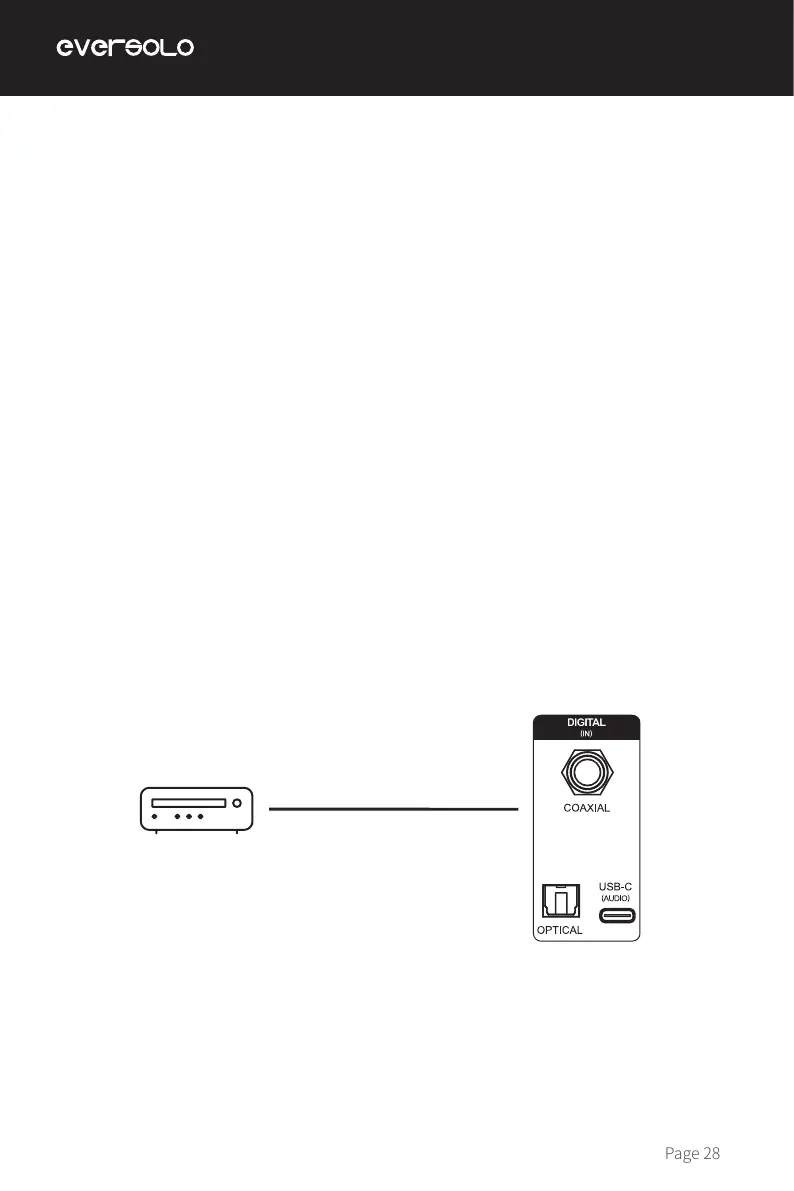
Use an Optical or Coaxial audio cable to connect front-end equipment (like media player
and CD player) S/PDIF output with the device’s Optical or Coaxial input. Go to "Settings >
Source > Internal Player > Optical/Coaxial In".
Notes:
*Please use 75 Ohm Coaxial audio cable for Coaxial connection.
*Please use standard optical audio cable for Optical connection.
*Optical/coaxial input supports up to PCM 192KHz 24Bit, MQA and DOP64.
Optical/Coaxial Input
Optical or Coaxial audio cable
External playback device
(CD player/digital decoder /player)


 To Next Page