1
ST812 FLOOD DETECTOR
These instructions should be read in conjunction with your System Installation
and Operating Manual and be retained for future reference.
Product Layout
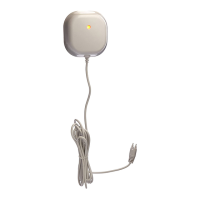
c Two-color Indication LED (red & green)
d Flood Sensor
e Sensor Rack
f Flood Sensor Cable Rack
g Link Key
h Battery Compartment
Introduction
The Flood Detector is a Z-Wave
TM
enabled device and is fully compatible with any
Z-Wave
TM
enabled network. Z-Wave
TM
enabled devices displaying the Z-Wave
TM
logo
can also be used with it regardless of the manufacturer, and ours can also be used in
other manufacturer’s Z-Wave
TM
enabled networks. Inclusion of this Flood Detector
on other manufacturer’s Wireless Controller menu allows remote turn-on of connected
modules and their connected lighting when the Detector is triggered. Z-Wave
TM
nodes
in the system also act as repeaters if they support that function.
The Flood Detector consists of a transceiver, flood sensor and 3-meter flood sensor
cable. Protect your property from water damage! The Flood Detector is designed to
sense the presence of water in basements, yachts and many others residential and
commercial applications, providing early warning of developing floods. The Flood
Detector is designed so that the transceiver is mounted on the wall and the flood
sensor is placed in a location where water presence, such as a result of leakage or
flooding, is probable.
Upon flood detection, the Detector will beep and flash and
report its status to the node ID. Once water is released, it will report to the node ID
as well.
The Flood Detector is powered by 3 x AA 1.5V alkaline battery. When battery level
drops below unacceptable level, the Detector flashes red LED once every 30 seconds
and reports low battery status to the node ID. When this occurs, the batteries should
be replaced as soon as possible.
Power Up
1. Undo and remove the screw from the bottom edge of the transceiver. Remove the
back cover.
2. Unscrew the screw from the battery cover and remove the battery cover.
3. Fit 3 AA size 1.5V batteries to the battery spring.


 To Next Page
 General